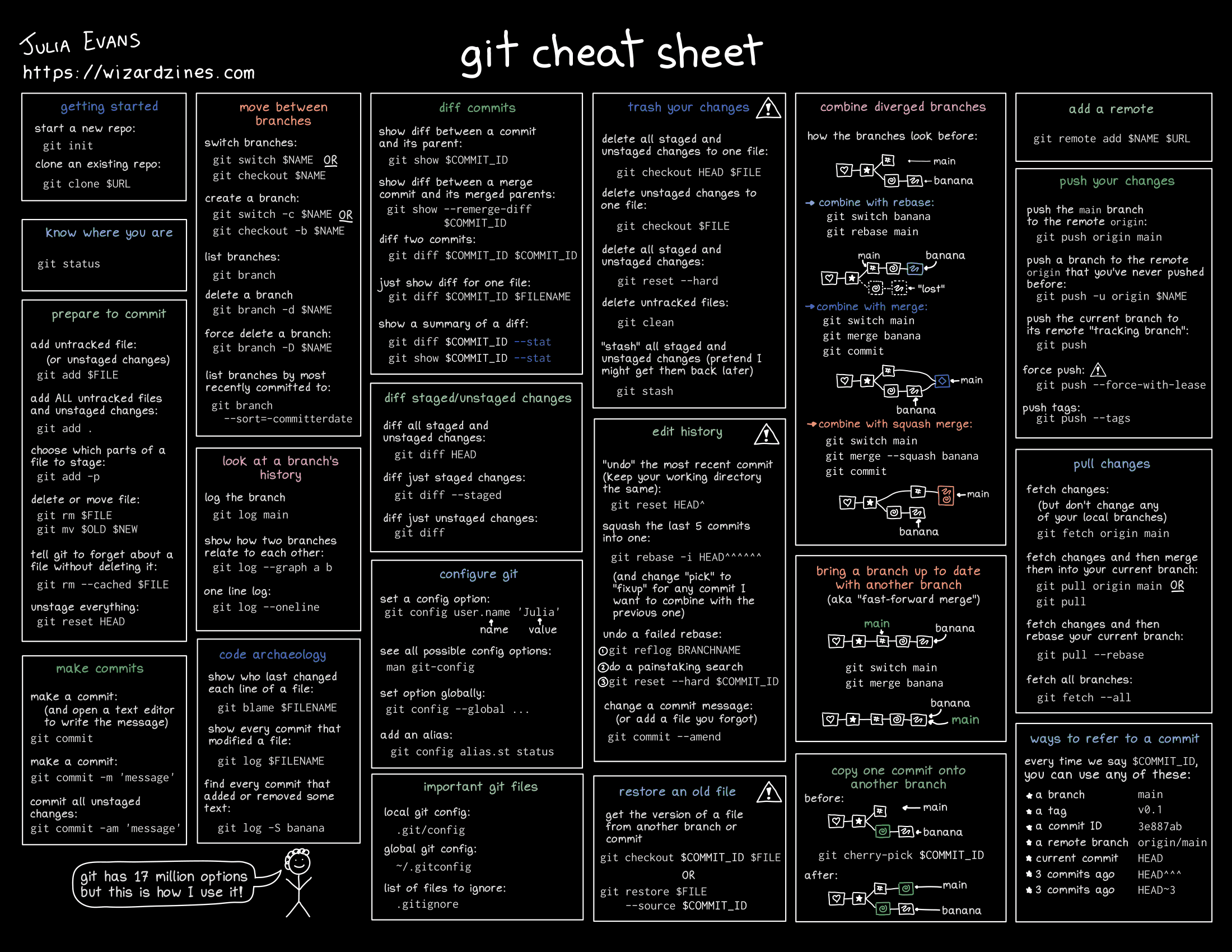
Git cheat sheets are a dime-a-dozen but I think this one is awfully concise for its scope.
- Visually covers branching (WITH the commands – rebasing the current branch can be confusing for the unfamiliar)
- Covers reflog
- Literally almost identical to how I use git (most sheets are either Too Much or Too Little)
Damn she has a ton of these helpful tech guides on her site under “Comics”.
My ideal workflow: make the smallest, fastest possible PRs so there’s no tomfoolery.
This is my take as well, and yet I have an 70+ file PR still pending a complete review… But to be fair that pr required me to change half the code base to change to a new network stackm.
Missing the “oh shit need to fix this other thing but I am in the middle of a big change,” flow. I use git stash, but I wish I could include files that haven’t been added and I wish it could be tied to the branch
That sounds like the perfect situation to use
git worktree.I’ve stopped using
stashand mostly just commit to my working branch. I can squah that commit away if I want later. But we squash before merge so it doesn’t tend to be worth it.It’s just less things to remember.
The only time I see a rebase fail is due to a conflict. Which can be aborted with
git rebase --abortno need for reflogs unless you really mess things up.I’ll admit that in 10 years using git, I don’t think I’ve ever used reflog once.
It can be nice when you successfully do a rebase (after resolving conflicts), but change your mind about the resolution and want to redo it.
Doesn’t come up that much, but it’s been handy once or twice, for me. It’s also just nice security: no matter how I edit commits, I can always go back if I need to.
Maybe you resolved the conflict in the wrong way and want to restart after finishing the rebase.
Not sure I would say that is a rebase failing - just you messing things up. Can happen with any merge. But yeah that is a place where reflog would be useful. But I dont see why it would be on the cheat sheet instead of a
git rebase --abortor be rebase specific.
I went from GUI to terminal and I’ll never go back. Especially with interactive add,
git add -iWHAT
Try it out. It is a great utility.
I recently got on
git add -p, which comes in clutch sometimes. But yeah, I’m definitely about to start doing the interactive add.Also, squints at your username
Yep, #metoo, though I started with terminal. I still use GUI but mostly only for visualizing history.
I use the best of both worlds. A gui in the terminal. GitUI
In recent git versions (>2.23),
git restoreandgit restore --stagedare the preferred ways to discard changes in the working tree (git checkout -- .) and staged changes (git reset --) respectively.Huh, TIL.
To be fair,
git switchwas also derived from the features ofgit checkoutin >2.23, but likegit restore, the manual page warns that behavior may change, and neither are in my muscle memory (lmao).I’ll probably keep using checkout since it takes less kb in my head.
Besides, we still have to use checkout for checking out a previous commit, even if I learn the more ergonomically appropriateNo deprecation here so…switchandrestore.edit: maybe I got that java 8 mindset
edit 2: Correction –
git switch --detachchecks out previous commits. Git checkout may only be there for old scripts’ sake, since all of its features have been split off into those two new functions… so there’s nothing really keeping me fromswitch.Besides, we still have to use checkout for checking out a previous commit
git switch works on commits too. I don’t think you have to use checkout anymore.
Oh, you’re right. You just pass the
-ddetach flag. I stand corrected!
One missing point:
git stash $NAMElets you name a stash, and then you also can pop with that name to restore.Super useful if you’re doing something with plotting or presenting data and you want to try a few easy variants to see what you like most. I don’t use it all the time but it’s good to know.
git has 17 million options
proof needed /s
I wonder how many it actually is.
According to tab autocomplete…
$ git
zsh: do you wish to see all 141 possibilities (141 lines)?
But what about the sub options?
$ git clone https://github.com/git/git
$ cd git/builtin
# looking through source, options seem to be declared by OPT
# except for if statements, OPT_END, bug checks, etc.
$ grep -R OPT_ | grep --invert-match --count -E \
"OPT_END|BUG_ON_OPT|if |PARSE_OPT|;$|struct|#define"
1517
Maybe 1500 or so?
edit: Indeed, maybe this number is too low.
git showhas a huge amount of possibilities on its own, though some may be duplicates and rewords of others.$ git show -- zsh: do you wish to see all 489 possibilities (163 lines)? $ man git-show | col -b | grep -E "^ -" --count 98An attempt at naively parsing the manpages gives a larger number.
$ man $(find /usr/share/man -name "git*") \
| col -b | grep -E "^       -" -c
1849
Numbers all over the place. I dunno.
That’s less than I expected. If there’s 141 commands that on average comes down to 10 per.
I use like 4 git commands in prod (make a branch, rebase, rebase interactive, push) plus git gui & gitk.