

tell me the most ass over backward shit you do to keep your system chugging?
here’s mine:
sway struggles with my dual monitors, when my screen powers off and back on it causes sway to crash.
system service ‘switch-to-tty1.service’
[Unit]
Description=Switch to tty1 on resume
After=suspend.target

[Service]
Type=simple
ExecStart=/usr/local/bin/switch-to-tty1.sh

[Install]
WantedBy=suspend.target
‘switch-to-tty1.service’ executes ‘/usr/local/bin/switch-to-tty1.sh’ and send user to tty1
#!/bin/bash
# Switch to tty1
chvt 1
.bashrc login from tty1 then kicks user to tty2 and logs out tty1.
if [[ "$(tty)" == "/dev/tty1" ]]; then
    chvt 2
    logout
fi
also tty2 is blocked from keyboard inputs (Alt+Ctrl+F2) so its a somewhat secure lock-screen which on sway lock-screen aren’t great.
intel won’t allow its linux drivers to work above wifi 4 speeds in ap mode, so i created a kvm virtual windows machine with pci pass through on the wifi nic plus ip masquerade and now i’m getting wifi 6 speeds in ap mode.
I think NDISwrapper is still maintained for issues like this.
i wasn’t aware that you could use ndiswrapper on an access point; i’ll look into it.
UPDATE: googles says that you can’t do this because ndiswrapper uses windows drivers that don’t support ap mode.
The kludge wins. 😅
this is beautiful
it’s a pita every time something goes wrong; it works well most of the time, but it also REALLY sucks sometimes.
Lots of laptops just use a removable m.2 wifi card. Have you considered replacing it with something thats properly supported? I know hardware costs money but not that much probably.
It’s not a laptop; it’s a mini desktop that I obtained to serve as a wifi router; storage server; firewall; VPN; media server; remote file storage; and my cat’s favorite warm napping surface.
the wifi nic is embedded on the motherboard and it was chosen since it included a high gain antenna; among other qualities.
Wifi works fine if you use it in ordinary client mode w full Linux support and the hardware is capable of fully supporting ap mode in older Linux kernels; it’s just that Intel decided remove higher speed ap mode support in the latest versions of the driver to force people to buy thier more expensive wifi nics.
Ah okay thats the one kind of device where there is nothing you can really do true.
it’s an ordinary desktop; the screwiness is introduced by intel’s decision to remove ap capability from its recent drivers.
I like to use
unclutterto hide my mouse pointer after a few seconds without being moved.Now, the thing is, it doesn’t just visually hide the cursor, it actually removes it, so UI elements triggered by hovering disappear. Sometimes that’s great, other times it’s infurriating, like when reading a tooltip or menu.
I mostly use a touchpad, and so I developed a habit to wiggle my finger while I’m intentionally hovering something, so that there was enough mouse movement for
unclutterto not remove my pointer.Then I found a setting for the jitter threshold of the touchpad. Basically, with the threshold on, it ignores tiny movements, because the hardware reports finger wiggling, even if you hold your finger perfectly still. Which is perfect for me to turn off.
Now when I have my finger on the touchpad, it automatically wiggles and allows me to read hover elements. If I take my finger off, it stops wiggling and removes the cursor.
It’s almost like someone designed an OS with touchpads in mind, rather than them being an afterthought.That reminds me of this
Everything here reminds everyone of that.
What is
unclutter?Uh, well, I kind of already wrote most of what there’s to say in the comment above, it hides your mouse pointer when you don’t move it for a few seconds.
In most distros, it’s available as the
unclutterpackage, directly from the repos. On Debian-based systems, the package you want is calledunclutter-xfixes.https://wiki.archlinux.org/title/Unclutter
It is built for X11 and won’t work on Wayland.
But KDE recently shipped a built-in feature as part of Plasma 6.1 (a Desktop Effect called “Hide Cursor”), which also works very nicely. That one does not cause hover elements to disappear.
This certainly isn’t of the same caliber as some of these other comments, but I found it to be fitting to the topic.
Last year I was having problems getting the game stellaris working on arch. (I use bazzite now, btw) My solution was the following:
- download the game via steam.
- switch it to use proton
- switch it back to linux version
- use the terminal to make the entire game folder read-only, so that steam couldn’t touch the game anymore and screw it up.
- add the exicutable to PATH
- start the game via terminal
If any one of those step was left out, it didn’t work. I’m no linux expert, so I didn’t have the skills to actuality find the real problem.
I… What? Why does that work? How did you figure this out?
Blind trial and error, mostly. Making the game folder read-only was the real “duct-tape” part, it occued to me to do that after steam kept “updating” the game and breaking my solution.
Even when Proton doesn’t work, it still somehow works.
Magic.
Indeed. Proton for the win yet again.
I duct taped a Raspberry Pi to the back of a television once. Does that count?
I personally like this, so as far as I’m concerned, yes.
I duct taped a RPi4 to the back of a Motorola Lapdock and used custom cables to make the combo into the worst laptop ever. If yours counts, mine does too. This is what the Lapdock looks like:
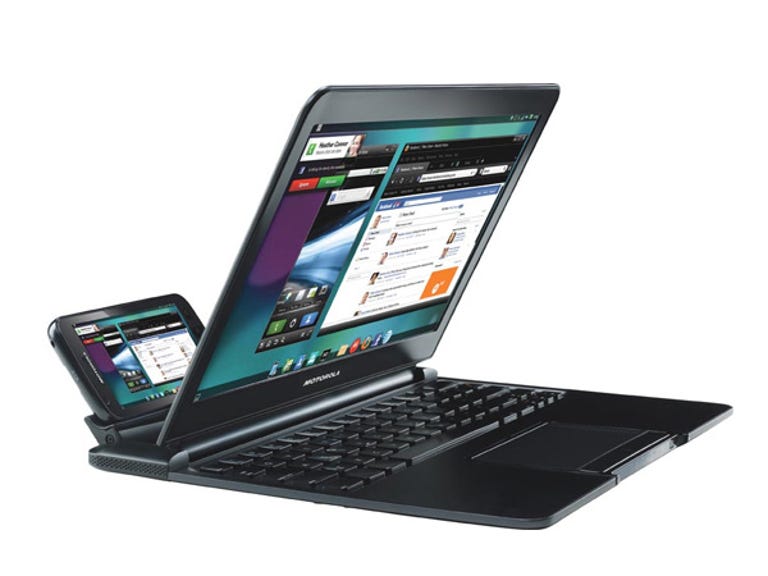
Tbh I’ve always wanted to do this
It’s good for bragging rights, but a u2955 Celeron Chromebook is better value for money.
I have an old laptop running some basic services.
I have taken it apart before to replace the hard drive with an SSD, but I never replaced the dead CMOS battery because you have to literally completely disassemble it to get at the battery.
So I have a cronjob that runs on startup to change the system clock to the right time-zone.
Debian (and Ubuntu) has the package “fake-hwclock”. I’m sure other distros do too.
Periodically saves the time info to disk and resets the clock with it on boot.
I had to use unity game engine for one of my assignments for school, but unity wouldn’t generate files needed for the language server unless I set the code editor to vscode. I fixed this by creating a bash script with the path
/usr/bin/codethat opensneoviminkonsole.#!/usr/bin/env bash konsole -e "nvim $@"based
I have a folder full of scripts tied to aliases that fix various things when they go wonky, and I’ve long since forgotten what any of them do. I just know if
xxxapp stops working, I typefix_xxxinto the terminal and then it does a bunch of stuff and then it works again lol.Also I have a bunch of aliases tied to common tasks, like
e1= reboot,e2= shutdown etc. I have no idea where that habit came from.Edit: ALSO, just the general mish-mash of apps. I won’t have anything to do with Snaps, but the rest of it is an unholy combination of native apps, things from the AUR, flatpaks, Appimages, Docker containers and wine setups, mostly (but not all) in Bottles.
I dare you to try
grep -Irn aliasin your home dir.I’m not even sure what that would do! Presumably list every time the word alias appears in every file across the whole home directory or something like that?
Rtfm!
No, seriously, -I avoids binaries, -r recursively, -n print matching file and line number.
Alright, I’m gonna try it and see how long this takes!
edit: about 8 minutes. Not as spectacular as I’d hoped lol
If you have games there, yeah. Ripgrep is way faster. But grep is good enough in most cases.
Btw, did you find your aliases?
I did! I know where they are and which scripts they point to, but as for going into the scripts and trying to remember what they’re actually doing… I’ll get to it some day lol
now im really curious about that
xxxapp…
I’m using Gentoo with systemd and a customized kernel, and additionally I have the
/usrpartition LUKS encrypted. Because/usris absolutely essential for systemd to function, I configured dracut to make a specially crafted initrd which activates the luks lvm and prompts for the password to decrypt and mount/usron startup before systemd init tries to run.About a year or two ago, some update to dracut or some other dependency (assumption) caused the dracut generated initrd’s to kernel panic. After multiple days of troubleshooting, I discovered that just copying forward an older initrd in
/bootand naming it to match the new kernel, e.g.initramfs-6.6.38-gentoo.img, allows the system to boot normally .So, my Gentoo is booting a kernel
6.6.somethingwith a ramdisk generated in the5.9kernel era. I am dreading the day when this behavior breaks and I can no longer update my kernel 😳I can hear the ticking…
BZ2-ing up a terabyte of zeroes (back when a TB was more than people commonly had, then zipping that file up together with another file, to bypass virus scanners in emails that prevent emailing .exe files.
I’ve also seen a self-referential .zip file somewhere that contains itself.
A zip quine? That’s genius
Had a Centos VM that kept slipping time. Every week it would loose about 30min. No amount of NTP syncing got the time correct until manual intervention.
Msp couldn’t work it out, couldn’t rebuild the server for infrastructure reasons, and only that server had the issue. The other 3 VMs on that host were fine.Cron job on one server took it current time, sshed to the dodgy server and configured the correct time.
I ran out of crtcs, but I wanted another monitor. I widened a virtual display, and drew the left portion of it on one monitor, like regular. Then I had a crown job that would copy chunks of it into the frame buffer of a USB to DVI-d adapter. It could do 5 fps redrawing the whole screen, but I chose things to put there where it wouldn’t matter too much. The only painful thing was arranging the windows on that monitor, with the mouse updating very infrequently, and routinely being drawn 2 or more places in the frame buffer.
Now THIS is a duct tape solution!
Oh dear
An old (now decommissioned) notebook of mine had a broken headphone jack. I didn’t have BT headphones then. Audio output worked technically but the detection whether headphones were plugged in or not did no longer work.
I wrote a very short amixer script to force unmute the jack, set the volume to 50 or so percent and set the speaker volume to 0% but not “mute” state. I could then use my wired headphones again.
On my previous laptop, the trackpad had a bug that made it spam interrupts after waking up from sleep. It ruined battery life and basically kept one core at 100% permanently.
So I duct-taped a systemd script that unbound and bound the trackpad after each wake up.
#!/bin/sh case "$1" in post) echo -n "i2c_designware.0" > /sys/bus/platform/drivers/i2c_designware/unbind echo -n "i2c_designware.0" > /sys/bus/platform/drivers/i2c_designware/bind ;; esacSome years ago, I had a client with a really fucked up set of requirements:
- Must run Gentoo Linux. (No, I don’t know why. But it was written into the project specs and everybody who had to sign off did.)
- Must use LUKS for FDE.
- Login (loosely interpreted as “booting up”) must have MFA.
This was during the days when booting into a LUKS encrypted Gentoo install involved copy-and-pasting a shell script out of the Gentoo wiki and adding it to the initrd. I want to say late 2006 or early 2007.
I remember creating a /boot partition, a tiny little LUKS partition (512 megs, at most) after it, and the rest of the drive was the LUKS encrypted root partition. The encrypted root partition had a randomly generated keyfile as its unlocker; it was symmetrically encrypted using gnupg and a passphrase before being stored in the tiny partition. The tiny partition had a passphrase to unlock it. gnupg was in the initrd. I think the workflow went something like this:
- System boots up.
- Script in the initrd prompted the user for the passphrase for the tiny LUKS partition. (first authentication step)
- User entered passphrase.
- Script in the initrd unlocked the tiny partition and prompted the user for the passphrase to decrypt the root partition’s keyfile stored therein.
- User entered the symmetric passphrase for keyfile. (second authentication step_
- Script used the passphrase to decrypt the keyfile to stdout, piped into an evocation of cryptsetup to unlock the root partition.
- /dev/mapper/root mounted, /boot mounted, boot process continued.
- User logged into the box.
I don’t miss those days.
sssd didn’t work well with my company’s AD server, which would cause repeated authentication failures until I restarted sssd. I rigged up a bash script which would restart sssd any time xscreensaver logged an auth fail.