
I have not any prior experience with installing custom ROMs, but after trying it out (and getting stuck, and googling and finding answers) I successfully did it. Below is my home screen if anybody is curious:
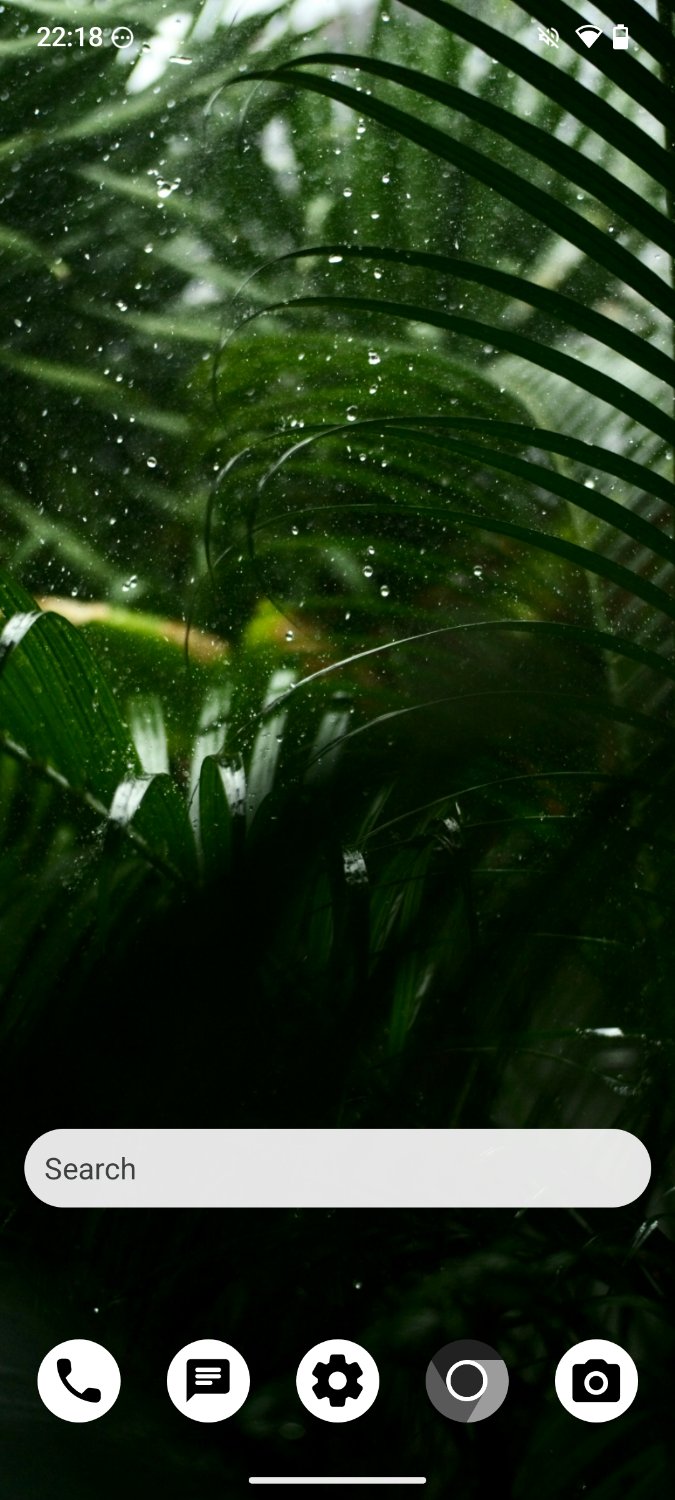
I use OpenBoard for my keyboard. Unfortunately I am still dependent on Play Store since some of the apps I need can only be found there. Sometimes it feels meaningless committing to this whole thing because I’m not perfectly private; then I think this is better than using a regular iPhone or Android phone.
So far I’m liking it. I am naturally inclined to feel hesitant about using this as my main phone and plugging in a SIM since it’s custom, but I’m slowly making the transition.
Feel free to share any beginners advice or your own experience using GOS for the first time. Cheers!
Aurora store is also pretty cool. You can download from there without a google account.
I just keep Play store installed with all permissions disabled, including network, and use Aurora store instead.
What is the main difference between using Play Store and Aurora store (logged in with your Google account)?
Aurora store has a cleaner interface with no ads and can be used without a google account.
I’m more curious about the privacy aspect of using Aurora over Play, especially considering since I will be logged into my G account.
When starting Aurora, you can choose between an anonymous account or your own. You can still use the anonymous option even if you are logged in to other services with google. If you go logged on anyways, I guess Google will not know your every tap with Aurora? I would think logged in, google play store and aurora would be comparable (not private).
Do you know if it’s safe to download banking apps from third party stores (in this case Aurora)?
I do not know on a technical level.
Aurora is a foss wrapper with fewer anti-features like ads. You could trust the client more ig if you’re using Aurora. I use F-Droid for most things and then Aurora for like 3 apps I’m not willing to give up and have no foss alternatives. I mostly just use Aurora out of principle for the apps I can’t get from F-Droid, but also I guess out of a lack of trust for Google (which I suppose is related to the principle of not using proprietary software anyway)
Even if apps you use depend on play store one of the things you can do on GrapheneOS is temporarily disable it and only turn it back on when apps refuse to run, another option is just keeping those apps in a separate work profile.
all android phones can temporarily disable an app until you turn it back on.
No, that only applies to (some, not all) system apps. GrapheneOS allows this for all (including user-installed apps): https://grapheneos.org/features#user-installed-apps-can-be-disabled
adb shell pm disable-user PACKAGE_NAMEworked for me with Signal on a stock pixel
Sure you can do it through adb, but Graphene exposes this option in the settings. They also recommend against enabling developer settings and using adb for security reasons.
But you said “no” before… I was just showing that it is indeed possible with non-system apps.
Yeah you’re right, I didn’t think of adb while writing that comment. It’s not possible through the settings is what I meant.
yes also including uaer apps: for example I can disable whatsapp by putting it in deep sleep and disabling its allowed network for extra measures, then it wont ring, wont update store version, wont recive calls, nor messages all while I’m online watching youtube for 2 hrs, then I can enable allow mock location and once online I’ll appear in brussel. btw I all non-rooted Androids can but Apple Users cant do any of that with their phones
Not all of them can disable google play service apps
I would argue you shouldn’t be using those apps in the first place since they all contain proprietary blobs (yes that includes Signal, see Molly-FOSS for a non-blobbed fork).
Molly also includes other useful features like database encryption and UnifiedPush support.
Yes but for me it is a non-starter for legal reasons because screenshots do not work with fingerprint lock turned on. I don’t understand why the user cannot choose to enable this or not like other apps can (including Signal).
Absolutely, my suggestion was just for folks who have apps that still require play services, not everyone can avoid it, but you can minimize usage if you do need them.
Not google services
Aurora store and F-droid will be your besties, you don’t need play store unless you have purchased something.
I suggest Droid-ify over the F-Droid store for ease of use, but both work fine
deleted by creator
Unfortunately I’m experiencing the same thing :( Not too big of a deal for me to do manual updates once every two weeks or so but still an annoyance
I like neo store
You don’t need Play Store if you’ve purchased something. I had to use a paid app for a few years and installed it through Aurora. You can install paid apps on Aurora if you log into the google account you bought it on.
Thanks for the heads up.
Been using that for a few days now, I’ll never go back to AOSP, gboard, heli, nor anything else. Saw a video of who I think is the head of futo, giving a no fucks given presentation, says he’s tired of non google keyboards that make it feel like your typing drunk. Website has a QR code to add the Futo repo to fdroid, ez pz.
deleted by creator
I didn’t dislike Heli, just my accuracy to hit the correct key felt immediately better using Futo.
deleted by creator
Futo also has the hold space bar to move cursor by default. I just wish it had single hand mode.
deleted by creator
Unfortunately not FOSS
Source available is not the same as FOSS. Being able to access the source code is only a precondition to software being considered free. Their licence is not a FOSS licence.
I wasn’t meaning to conflate the two, as I see your point. I didn’t claim it was FOSS, just that the source was available.
I know for me, I don’t mind using software that is licensed so that it doesn’t directly fall under FOSS. I just like the availability to view the source vs closed source software being a total black box.
I have no plans to monetize their work, nor fork it, only use it.
Well that’s the difference between source-available software, open source software and free software. FUTO’s license may be source-available, but it’s not open source.
FOSS stands for Free & Open Source Software. FUTO is neither free software nor open source.
I understand that. I didn’t call FUTO FOSS…
I’d love to try out GrapheneOS (or another OS), but I can’t afford a second phone, and there’s no way I’m gonna dive head-first into something entirely unfamiliar to me when it’s my only method for telephony.
It does function just like any other phone so far I’ve tested. No app that simply doesn’t work. And if it doesn’t, you can simply exploit the GOS hardening in settings to improve compatibility. You overall have more control over any app, which I like
I feel the same. If I try to install a different ROM and it falls I could be without a phone for a bit.
deleted by creator
I was shocked to find out that the hardest part of the installation was finding a Chromium based browser on PC lol
All you have to do to install GrapheneOS is press one button in the WebUI. No other ‘ROM’ has been easier to install.
You can also use a Chromium-based browser on another Android device
Exactly.
It is really similar to stock android in terms of functionality. It’s just degoogled and hardened. It’s designed to be user-friendly and not for tech-savvy people (though tech-savvy-friendly—which is part of being user-friendly imo). I promise you you can use it out of the box once installed just like a stock android install. The only thing to be aware of is to install some kind of package manager like fdroid or aurora store, or even grapheneos’s unprivileged google play store, to get apps, unless you just want to use the stock apps it comes with i guess in which case you probably shouldn’t waste money on a smartphone.
Really? That’s awesome! I think I’ll check it out. :)
Edit: …Seriously? They only support Pixel devices? Wow. Fuck this.
Yes, only Pixels are officially supported. If you want to add support for other devices, it’s a foss project and you’re welcome to write the code yourself. For other devices there are other degoogled OSes you can use. Graphene is generally considered the most secure but if you have another phone you can install one of the other AOSP forks or turn it into a linux phone or something
Its also worth noting Graphene’s focus on pixel devices stems from those devices having more easily secured hardware. Which android fork you decide to use will depend on your particular use case. I wound up going with a Pixel and Graphene for android auto. But if you’re someone with existing hardware that you want to set up with a degoogled os, there’s e/os, lineageos, CalyxOS, iodé, and, if you wanna get really weird, postmarket os. Having done a deep dive into this I can honestly day there’s no single OSFA answer to this.
I did not realize there were other forks besides Graphene and LineageOS.
In any case, thanks for the info. I guess I’ll have to shop around.
deleted by creator
You can set up multiple user profile and install the play services in only 1 profile if you want to jeep other profile more private
I recommend you use GrapheneOS as your daily driver. There’s not really any reason not to. I have been for years and never had trouble.
I’m curious why no one recommending FlorisBoard.
I’ve been using GraoheneOS as my daily driver for months now. I still have issues with things that need Google Localization (car sharing program in my city for example) and I’ve had a few banking apps complaining when being installed from the Aurora Store.
I miss having my cards on my phone quite a lot.
FUTO Keyboard is really nice imo
I tried Floris board. Its particular rough patches are deal breakers for me, but I’m sure my keyboard of choice has rough patches that would be deal breakers for potential Floris board users. I hope some people see your comment and give it a try. It seems like a promising project
Today I learned that Vanadium has a search widget, so thanks for the post :D
It gets me wondering, I have never use a search bar widget in my life and I find them rather setting in the way… My search bar is just 1 tap away inside Firefox, which is also on the desktop… I’ve not seen many people around me use it
Do people really use it?
Well I used to use it when I was still using normal Android. When I open Vanadium I get greeted with the last page I visited and I get distracted from that, so a search widget helps me.
Makes sense. Whenever I open Firefox, of opens on the (empty) homescreen where I can start typing in the URL bar right away. But everyone has got their own ways!
Sorry for the noob question, but are you able to access your banking apps with GrapheneOS? If so, how?
For me, going into the app info and enabling “Exploit protection compatibility mode” worked for banking.
Most apps should work with no issues. There’s a compatibility list at https://privsec.dev/posts/android/banking-applications-compatibility-with-grapheneos/
I’ve used four different banking apps (admittedly banks which may not operate in your country, but they’re popular enough in my country) on GrapheneOS no problems. I currently don’t have a banking app installed because I don’t need one and it’s probably spyware. I just do my digital banking in my web browser. But if you want to install a banking app, it should work completely fine, save for notifications—a lot of proprietary apps seem to rely on Play services for notifications 🤷♀️
Have you checked out this?
Yes. The reason I don’t use Aurora is because I’ve heard it’s instable sometimes and uses many anonymous Google accounts in order to install apps. I feel safer using my own burner account for that.
You can also use your own Google account in Aurora store.
Interesting. I’ll check this out later.
Definitely do! I also suggest Droid-ify for FOSS apps :)
There is also Neo Store which can be used as a F-Droid client.
I think I can live without playstore completely but I might need K-9 with Google emails for some stuff on my device, so I guess I’m not escaping Google spying on my IP address anytime soon. Other than that, I don’t use Google or apps from the playstore at all
I guess I’m not escaping Google spying on my IP address anytime soon
Use a VPN. No reason not to if you’re concerned about privacy—otherwise you have no privacy as your ISP can monitor you. If cost is an issue, ProtonVPN has a free tier, otherwise I recommend Mullvad as an affordable and really reliable and decent option imo. I found ProtonVPN’s connection to be kind of volatile when I used it (I paid for it too, on the highest tier). Mullvad has always been super reliable though. Whenever I’ve had connectivity issues it’s always been because of whatever network I’m connected to, not because of Mullvad.
Yeah I probably should but the WiFi at work doesn’t let wireguard through (I have a wireguard server running on a VPS)
What are your concerns regarding using your SIM card?
It’s actually nothing but beginner paranoia. Will it work properly even on a custom ROM, is the main question spinning in my head.
Works for me on Verizon and has for 5+ years. Google Fi even works as I’ve tried that with a different phone on GrapheneOS.
When I last used Graphene, it was on a pixel 4 XL, and I used a Google Fi sim card just fine. Texting, specifically MMS was borked, group chats would just be massive sentences of spaghetti letters. Other than that though, issue free.