I’ve used a US-QWERTY keyboard layout my entire life. I’ve seen other layouts that do things like reduce the size of the enter/backspace keys, move the pipe operator (|) and can’t wrap my head around how I would code on those.
What are your experiences? Are there any layouts that you prefer for coding over US English? Are there any symbols that you have a hard time reaching ( for example)?
Never used a US keyboard in my life. Why would you think US keyboard is the norm?
You’re on /c/programming.
Also, it’s even ISO standardized, so yeah, it’s an international norm.
Pragmatically: most programming languages are developed in a way to that it’s easy to type them up on a standard us layout. As English only has 26 letters, which is less than any other language using the latin alphabet (don’t even start me on languages with accents like ñ or that differentiate between à, a, á, and â), all the special characters are usually easily accessible. Most others layouts will tuck them away behind non-trivial combinations in favor of improving accessibility of extra letters and special characters. Cuz essentially in human language you barely need
*and[. So, I guess, right ctrl + left shift + 9 will do? how do you feel about coding in python on that. Or on a keyboard where the space for your|has been allocated to some letter ø and your OR operator has been moved to the numpad.You’re on /c/programming.
Could just as well have been a writing prompt community. It’s just writing ANSI characters for the most part.
Also, it’s even ISO standardized, so yeah, it’s an international norm.
I’d wish something being ISO meant it’s the norm, but that’s just not the case. #ISO8601Gang
Pragmatically: most programming languages are developed in a way to that it’s easy to type them up on a standard us layout. As English only has 26 letters, which is less than any other language using the latin alphabet (don’t even start me on languages with accents like ñ or that differentiate between à, a, á, and â), all the special characters are usually easily accessible. Most others layouts will tuck them away behind non-trivial combinations in favor of improving accessibility of extra letters and special characters. Cuz essentially in human language you barely need
*and[. So, I guess, right ctrl + left shift + 9 will do? how do you feel about coding in python on that. Or on a keyboard where the space for your|has been allocated to some letter ø and your OR operator has been moved to the numpad.As a user of a keyboard layout with æ, ø, å, who also uses python daily, I can promise you that there are zero issues with it.
Most people will grow up with a keyboard layout designed for their native language’s need. If it uses Latin characters, there should be minimal issues using it for programming too.
I just explained what the issues are. Programming languages heavily rely on special symbols.
If you haven’t watched yourself from the outside, how do you know “there are zero issues with it”? You might be constantly breaking the typing flow and need to use a two-hand combo for some mundane
[]. While someone on a US layout never needs to lift their hands of the keys, because all they need is actrlwith a pinky + right hand within reach.When I learn a new language, I also learn a keyboard layout for it. Or do you also write in Spanish on your keyboard? How do you make an à and an á?
Ah, that’s right, you speak two languages, you’re stuck using your comfort zone layout, and you’d ofc argue “zero issues”.
If you haven’t watched yourself from the outside, how do you know “there are zero issues with it”? You might be constantly breaking the typing flow and need to use a two-hand combo for some mundane
[].Because I don’t have the issue you’re projecting. And if someone do have that issue, what type of programmer (assuming no physical disabilities) has their productivity limited by their typing speed? No one would be my guess.
While someone on a US layout never needs to lift their hands of the keys, because all they need is a
ctrlwith a pinky + right hand within reach.Cool, same here , just that sometimes we press alt gr instead of ctrl.
When I learn a new language, I also learn a keyboard layout for it. Or do you also write in Spanish on your keyboard? How do you make an à and an á?
ctrl + \ and then a for à and alt gr + \ then a for á. It’s really not much of a hurdle. And definitely faster than trying to learn a new keyboard layout that I can’t type on without looking.
Ah, that’s right, you speak two languages, you’re stuck using your comfort zone layout, and you’d ofc argue “zero issues”.
Are we talking actual languages or programming languages? Either case, you assumption is wrong. I don’t understand where all your antagonistic energy is coming from. It’s just a keyboard layout, there isn’t a single correct one. Just use what you’re used to and that you can write with a good flow, which for most people will be the layout they grew up with and can type in the blind with.
There’s lots of programmers on languages that need more keys readily than us keyboard has. Äöüß, just to give an example.
I don’t know, every time I read a post like this I’m kinda speechless. I know lots of Americans and many of them are brillant and open-minded, but then there are posts like this which are completely oblivious that there are reasons for other keyboard layouts.
The reason OP can’t fathom programming on those is that they aren’t used to it. If you grew up with non-us layouts you similarly couldn’t fathom programming on the us layout.
Sometimes I feel like people refuse to even think about acknowledging that there are other experiences than their own. Go out, try out new things, exercise your brain and callenge yourself.
I’m not American, I speak a few European languages, I can type on a multitude of layouts. They all suck for programming, I know firsr-hand. And watching those people who “grew up with a layout” to use two hands for a
ctrl+zis both hilarious and painful.Wtf, who needs two hands for that? Do they have children’s hands?
It’s all a matter of habit - for me all layouts but my native sucks for anything to do on a keyboard. The only thing that sucks is if keybinds are set to shift-/ because / is already shift-7. I haven’t found a replacement for that yet. Forgot which program used that and for what, but I remember it was a bummer. Still wouldn’t spend all that time and energy and slowdown learning a different layout.
So now we go from “you are so culturally dense” to “I’m unable to learn a different layout”, “what’s wrong with your hands are you a midget”.
Not culturally dense, but absolutely unwilling to consider cultures outside their bubble other than as mere curiosities for entertainment. I stand by that.
Not unable to learn a new layout, but unwilling, because I don’t see the point. Why would I waste time and energy on something that will at most bring me one more shortcut to use? Programming is not about typing speed. If the bottleneck for you is typing speed, your job is very different than anything I’ve seen or heard of.
I have never seen anyone but my computer-illiterate mom use two fingers for ctrl-z, hence I was expressing my bewilderment about that. I’ll probably be able to do that move blind with one hand, and so are all of the people I know who use the computer in a professional setting. The only explanation I had for that was that they have exceptionally small hands so it’s a necessity. If you want to take that as an insult of your hands, be my guest, but I’m done here.
what
I’m pretty sure most people outside the US do that
I use the UK layout, because I am British. Why would I use the US layout?
US-defaultism has a catch: it sometimes accidentally extends to the Commonwealth. You won’t run into most of the internationalization quirks if all you’re comparing is “British English vs American English”.
[Sidebar: I notice this also when English speakers online assume that their audience at least has a vague idea of what Imperial units are, but while that is true of most native English speakers in the northern hemisphere who use feet and miles colloquially, for ESL audiences it’s almost always incorrect]I switched from AZERTY to US QWERTY permanently specifically to avoid all the issues of badly internationalized software. Bad default bindings (e.g. common vim operations like
{requiring the use of AltGr), but also things like games not working at all or only partially (e.g. the number row being either unbindable, or key hints naively showing as “&” and “é” instead of “1” and “2”). Surprisingly few devs understand the difference between key codes and characters, and lots of indie games straight up don’t even internationalize and require switching layouts (good luck if there is an in-game chat).
After getting into mechanical keyboards, the ANSI US keyboard layout has been useful as well because these are quite common. ISO mechanical keyboards are rarer, and Belgian AZERTY keycaps are borderline nonexistent.Also in practice I use the qwerty-fr layout which is the US layout with a French layer on AltGr. The kicker? It’s better at writing French than the French AZERTY which is missing a lot of letters (Ç, æ, œ, À, …). AZERTY is a terrible layout but that’s a separate discussion.
Of course the Americans should develop properly internationalized software, but I personally know several fellow Belgians who switched to QWERTY for (some of) the reasons outlined above.
I program like I learned it? I use my German QWERTZ layout. A lot of keys are different, yes, but I grew up with this layout and I’m used to it. Imagine giving me a US QWERTY layout and I would misstype every time. I even hate it when Windows swtiches my keyboard layout, even though I removed the shortcuts to it and I misstype constantly. Heck even Visual Studio switched my shortcuts and it sucked.
After some time I realized that (Game) Devs suck, because they forget that other layouts exist. Its not a big deal, but at some point I realized that the Chats on T, Y, U makes much more sense on a QWERTY Layout. Also Markdown with ` kinda sucks. For a codeblock, I need to hold shift and press the key that is left of backspace 3 times and then one space, because when I press it once, nothing happens but pressing it a second time, 2 appear. Pressing space let it appear directly. Or I type 4 and remove one.
But this it what I’m used to. And if I ever would work outside Germany, I will bring my own QWERTZ keyboard and require them to install the German Keyboard. I don’t need a German UI. I have all programming related software in English, because its easier to google stuff.
I ever would work outside Germany, I will bring my own QWERTZ keyboard and require them to install the German Keyboard.
The computer doesn’t know which labels are printed onto the key caps. You can type any layout you want, no matter the physical layout.
Except that there exist multiple physical layouts and then keys can be missing and some keys are shaped different.
Swedish layout. Not ideal for coding (too many things like curly and square brackets etc are under altgr. And tilde and backtick are on dead keys.
But switching back and forth as soon as you need to write Swedish (for the letters åäö) is just too much work. And yes, in the Swedish alphabet they are separate letters, not aao with diacretics.
deleted by creator
I have the same problem in German (ä, ö, ü and ß), and I’ve resigned to using US layout with caps lock mapped as compose key. But then again, I code more than I write texts
In polish we have ź and ż. For ż we use Alt gr + z, and for ź we use Alt gr + x. Same for other non-standard letters. The rest of the keyboard is a regular US layout.
So in Swedish you could use Alt gr + a and Alt gr + s for different variants of a.
You just… get used to things. Like how you first got used to your keyboard to begin with
Nope. I still hate ISO and KS/JIS with passion, even after spending years with those. Keyboard being anything other than ANSI is a huge dealbreaker to me now.
ISO for life.
You can keep your stupid tiny little enter key.
This!
Oh good I hate that tiny little enter key.
The enter key I got used to on an ANSI keyboard I had for a while but what actually made the bigger difference was the
\\/|key being above the enter key at the far right end of the keyboard which is hard to reach with the pinky. Rather important key for being that hard to reach.No way - the two enter keys are about the same size - yours is just rotated 90 degrees and further away. That’s not an improvement. Even worse though is the tiny left shift key - I can’t get used to that.
With an ANSI keyboard you can comfortably reach the enter and left shift without taking your other fingers off the home row. With ISO you have to move your arm which is particularly bad for the shift key since you might need to press other keys at the same time, but now your hand is in the wrong position.
hahaha, no.
On the ISO keyboards I’ve seen, the enter key has way more than double the surface area than ANSI, so it’s definitely not ‘just rotated 90 degrees’. Also these people probably grew up with ISO and struggle with ANSI, just like you probably grew up with ANSI and struggle with ISO.
my keyboard looks like this… so… no?
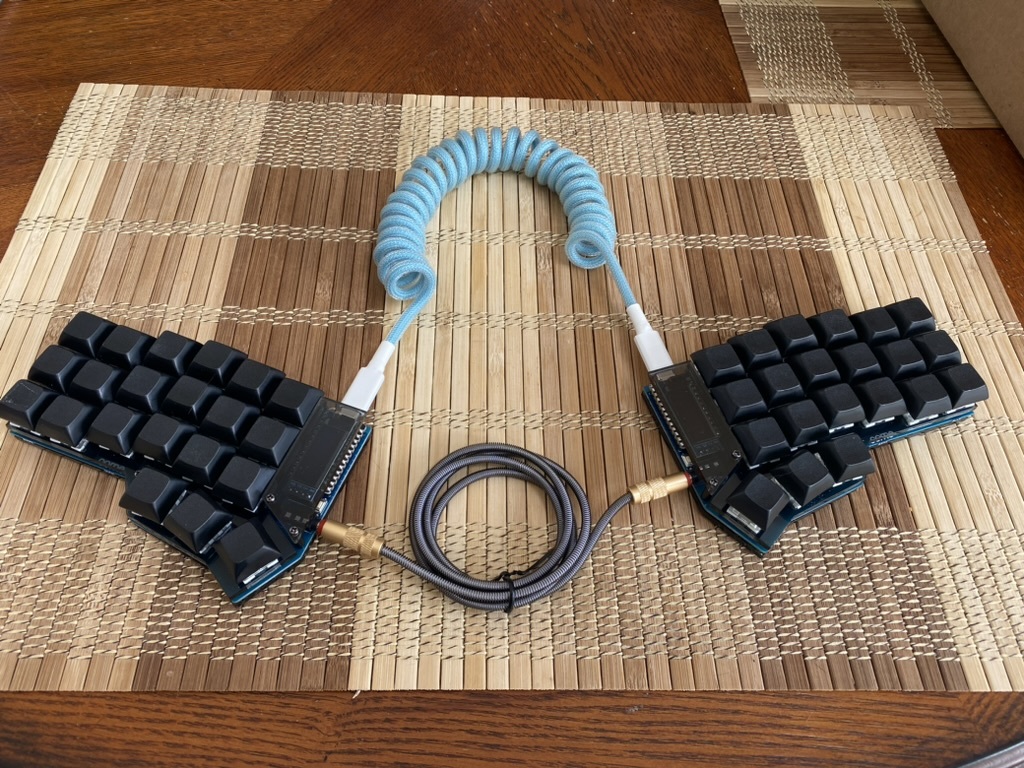
and honestly it’s so much nicer to program with a small keyboard. everything is exactly where you need it to be. I don’t ever have to reach for a key, as they’re all right there. And I can make them do literally anything I want. So many benefits of a small keyboard over a full size.
Why are there two cables connecting the left and right part? Just curious.
I believe the lower cable connects the two boards. The upper cable is for connecting to your device, so would only be connect to one of the boards when in use.
For looks. The middle cable is needed to allow the sides to communicate, but you only need one side plugged into the computer.
Exactly. If you are a coder and care about ergonomics of layouts, get split programmable keyboard, do not try to find good layout for normal keyboard, they do not exist. I personally do not like the particular keyboard at the picture, but there are many others to choose from and find a good fit for everyone.
When you install a fresh OS and it asks you about keyboard layout, how do you get it usable for this sort of keyboard?
deleted by creator
I’m not sure how far down the keyboard rabbit hole you are, so I’ll try and assume as little possible.
Generally keyboards like the one pictured are referred to as split keyboards. This one in particular looks like a Corne.
Most vendors sell split keyboards as kits that you’re expected to assemble yourself. This might require soldering and potentially sourcing certain parts (e.g. switches or keycaps) from other vendors. If you aren’t up for that kind of thing and you have the budget for it, some vendors sell pre-built keyboards. Buying a second-hand split keyboard is another alternative.
As for switches, MX and Choc v1 are the most commonly supported switch types. There are dozens of variants of said switch types; the main differences being the force curves and sound profiles.
The particular switches that are available will depend on who you end up buying from. Some keyboards support hotswap sockets, which allow you to quickly swap out different switches of the same type (i.e. MX or Choc). Otherwise you’re stuck soldering your switches onto the board, and if you aren’t satisfied with the switches that are already on the board, you’ll have to desolder them, learn to start liking them or buy a new keyboard. Whichever’s easier.
It’s a crkbd also known as a corne, like the other person said. There’s hundreds of types of switches available, the keyboard in the picture has Khail Box Jades and Khail Box Royals.
The style of keyboard is a split ergomechanical keyboard. The size is 36% or 40% depending on what generation of keyboard nerd you are.
deleted by creator
A lot of us don’t live in the US to begin with, so I assume a significant portion of us just use whatever the local standard is. That’s where I’ve been at so far, the Brazilian layout is a QWERTY variant so not that different. It does make some things more awkward, but you get used to what you have to work with.
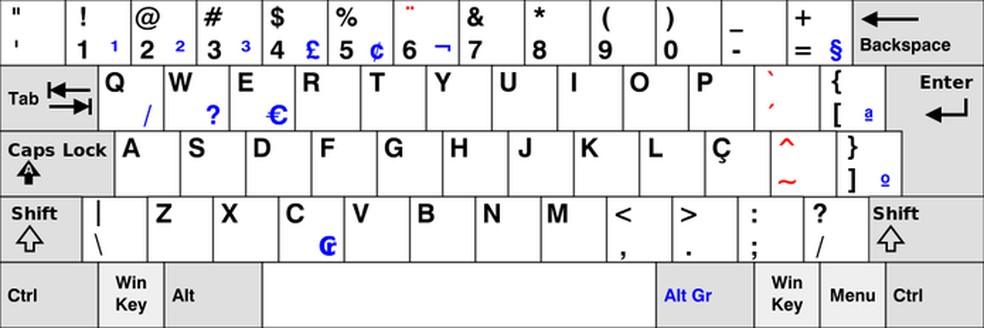
Brackets and curly braces are less convenient off the top of my head, backticks too. Vim is a tad less ergonomic without some extra fiddling, for instance. In fact, I’ve been considering getting a US keyboard for coding to make that kinda thing less of an issue, US international makes accents and whatnot accessible enough that I think I could make it work.
This PT-BR keyboard layout is a mess, a mix between the US layouts and the PT-PT one. That’s why you’ve less than convenient brackets and curly braces. Frankly I see no reason why there’s still this two layouts for the same language. Can’t we just agree on some mix of PT-BR and PT-PT?
I think the @ being a shift 2 would confuse me the most in the beginning, before getting used to it.
I’m a Brazilian web developer living in Germany for 32 years and actually never used a Brazilian keyboard. I may be returning to Brazil for a while, i don’t know yet if I’m adopting the Brazilian variant or just keep using the German one.
Ah, interesting! I’d have guessed about a dozen annoyances before that one even came to mind haha. Hope you have a good time around these parts at any rate :)
Also, I’d never taken a serious look at the German layout but going by the truly wild differences there you may as well stick with what you have IMO, I think it’s what I’d do at least.
I also never checked the Brazilian tbh. Guess I’ll just check it out, if the opportunity arises.
Yeah, it’s been a good time here - the pandemic and the inflation made things pretty difficult though, but i assume, just like the pandemic, everyone around the world is struggling with inflation atm.
What are your experiences? Are there any layouts that you prefer for coding over US English? Are there any symbols that you have a hard time reaching ($ for example)?
I’m using a PT-PT ISO layout keyboard, zero issues reaching anything, works as good as your US keyboard for coding. Actually it might work better because I have a bigger “enter” key.
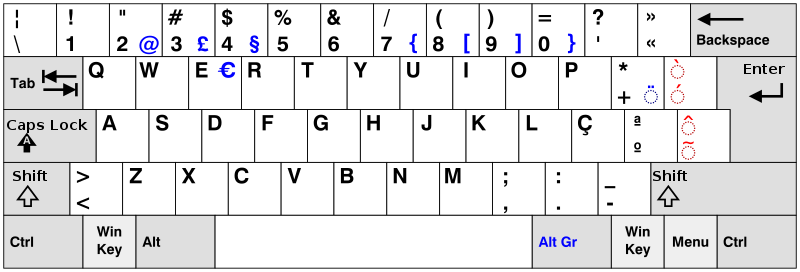
can’t wrap my head around how I would code on those.
Typical American trying to comprehend that people from other countries exist? :P
Think about it this way, all the EU keyboards are essentially the same as yours but tweaked to accommodate languages that have more special chars than English.
Fellow PT-PT ISO user here. And although I use PT-PT in the OS, both my mechanical keyboards’ physical layout is DE ISO, which has most special symbols in the same place. (finding DE keyboards is easier)
I’ve considered switching to UK ISO before. Typing brackets “
[] {}” and a semicolon “;” is harder in PT-PT. Especially the curly brackets{}, which are really awkward to type with my small hands.
I prefer a British keyboard layout as that’s where I’ve always lived and that’s what all the computers come with here.
Actually no, Apple fucks it up a bit by having a weird hybrid between US layout and British layout which is pretty infuriating to have to learn (opt+3 for the # character? wtf Apple?), particularly given I switch between PC and Mac daily
deleted by creator
I just press tab and the IDE sprinkles all that sugar for me.
Yeah I have a hard enough time remembering the default vim bindings, I can’t be assed to go around making my own up and trying to remember those too
UK layout is the GOAT. It isn’t that much different from US layout at first, but there are so many more special characters readily available. Particularly useful for multiple languages like Spanish, German, Swedish, etc.
I use this too, and find it better in almost every way.
Swapping
and"is a mixed blessing since the quote is used quite a lot when coding, but then so is the. In prose I prefer to use US-style double quotes for quotations and leave single quotes for contractions, possession, etc, so I have to do that awkward shift-2 combo a lot.Having an extra key is great for us coders since we use most of those weird glyphs (never used
¬) and having easy access to#is chefkiss.png.ISO layout’s tall enter key is great for touch typing since you don’t need to be very accurate with your little finger and moving the
| \key next toZis much more convenient. I like the symmetry of the slash keys, too.Alt-Gr make loads of shortcuts easier, although occasionally I want that key to be a normal alt instead.
Top one is ISO-UK:
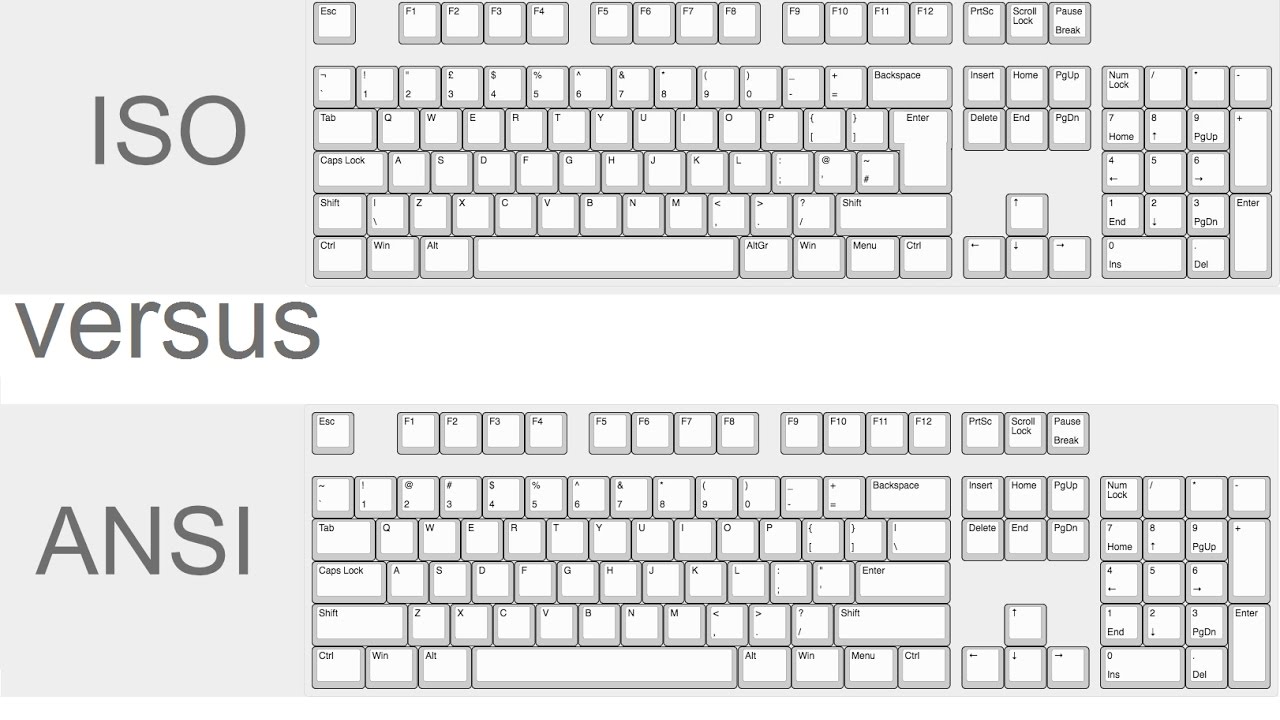
I’ve used various layouts of non-US keyboards over time since I’ve lived and worked in various countries in Europe and whilst you do start by looking down to find stuff and for a while will at times unthinkingly choose the “old” position for a symbol when touch typing, you just get used to the new layout in a month or two, even if touch typing - your brain just starts directing your fingers to the new positions.
That said, for seldom used symbols you still have to look down and check on which key that symbol is (it’s generally printed on the key), I suppose because you don’t really exercise those enough for your brain to reliably start sending your fingers to the new position without looking.
(So given the languages I usually program with, for stuff like semicollon and open and close brackets and parentesis the brain quickly adjusts but stuff like the dollar sign I still have to look down and check, which is really noticeable if for some reason I have to do some shell scripting or similar)
Things like letters and numbers don’t change position so that’s not a problem.
Once you’ve become accustomed to a new layout, switching keyboards between those layouts is a bit like switching the side of the road you’re driving (say, between the UK and Continental Europe) - you get a couple of hours of extra memntal tension and having to think things a bit more at first and after that you’ve fully readjusted.
Is there any reason why you didn’t just switch the keyboard layout to US if that’s what you’re used to?
I switched to US at some point because many if the keys for programming were just so much easier to access. If I have to use a pc for any decent amount of time, I just switch the OS layout to US now regardless of the layout that’s printed on the keyboard.
I’m not used to the US Keyboard layout.
I think I only used it when I got a cheap second hand notebook in Canada during my vacations there.
The reason not to change the keyboard layout to something different from the physical layout is that once in a while you have to use a seldom used symbol for which you don’t really have the touch-typing muscle memory, and looking at a physical keyboard with a different layour from the one you’re using at the software level won’t tell you were that symbol is, turning the whole thing into an unnecessary PITA of trying to find it by trial and error (I usually get this the other way around: when the software defaults to US Layout but my actual keyboard doesn’t have that layout).
I do more than just programming on keyboards and some of the languages (spoken, not programming) I write in have accents and funny characters which don’t even appear in a US Layout keyboard.
Also sometimes you really don’t have much of a choice if you’re in some country and the local employer/hotel/internet-caffee provides some local keyboard and you don’t have the permissions to change the layout in the OS.
Yeah, yeah, you do have to climb and overcome the small learning-curve of learning to adjust to new keyboards, but once you have it’s not at all a big deal to adjust to whatever you happen to get your hands on.
It depends on what you’re used to and the programming languages you use. I learned typing on a German QWERTZ keyboard and while that works for languages like Python and Haskell, which are indentation-based, but for languages which use braces like Java, C, Rust, or similar, it can be annoying to have to use altgr+7 or altgr+0 for { and }. Thus I switched to a US ANSI layout, which was nicer for those specific characters, but caused problems when typing local characters like öäüß. After switching to Linux I set up a compose key, letting me press compose + a + " for ä for example, and while that’s a decent patch, that still breaks the typing flow. So now I’m in my ergo keyboard phase and trying to get my own personal layout going, which meets my own needs for needed characters, based on a colemak-dh design.