who even decides what’s “modern” anymore?
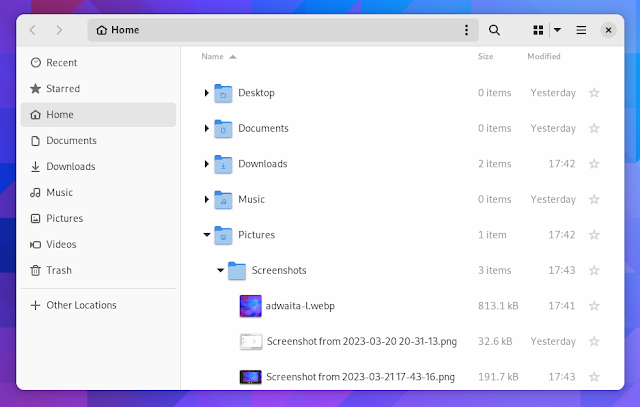
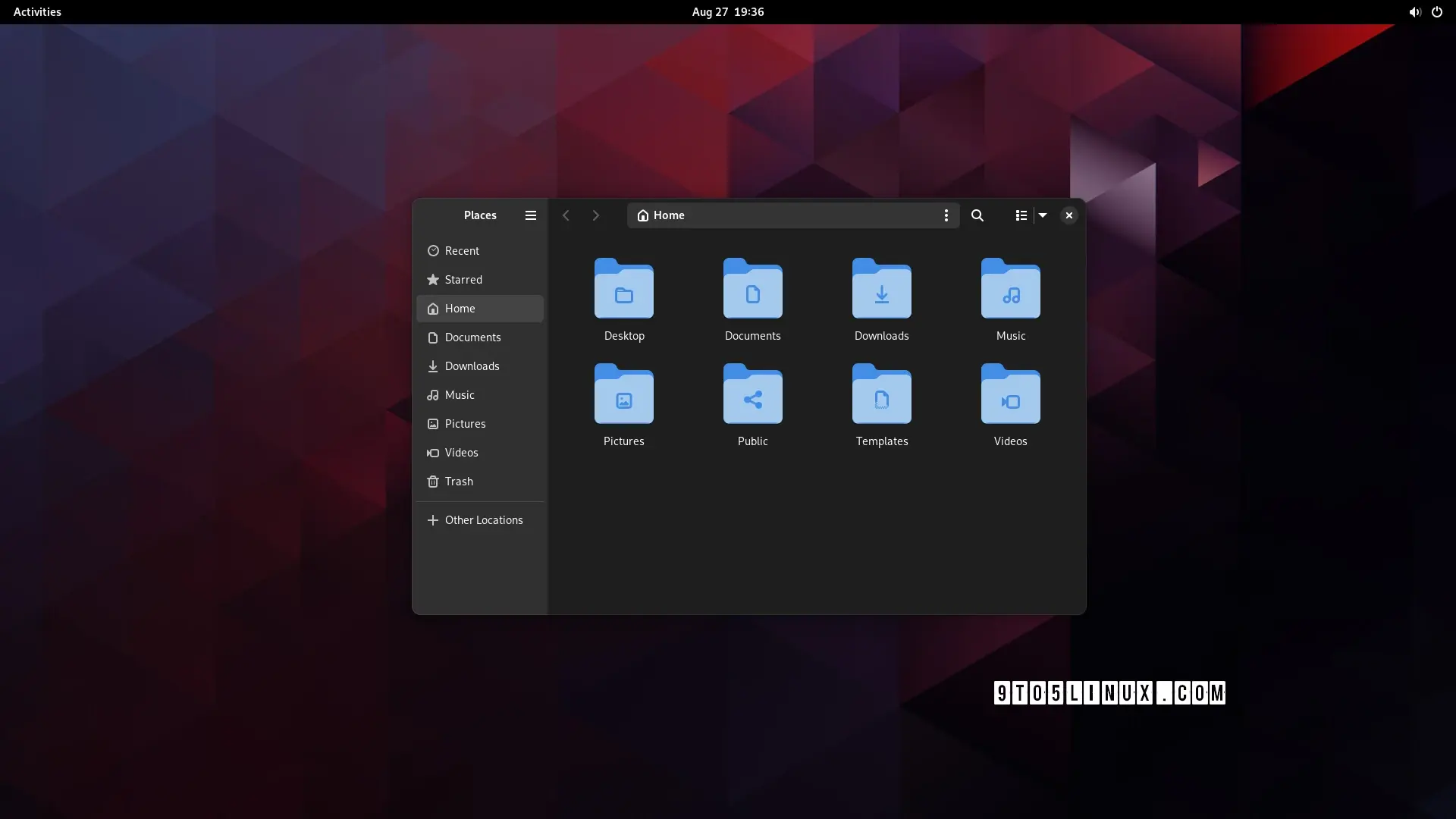
can anyone, honestly, without reading the article (or guessing from the headline), tell me which of these is the "modern" design?


edit: people are getting confused by the fact that one is tree view, not icons view so i changed the image. old image here
Apparently “modern” means hiding options behind extra clicks
i may be blind but what exactly was hidden behind one or more clicks?
Notice Min/Max buttons missing from window bar?
That’s the default.
That’s nothing new though, that’s been Gnomes thing for over a decade
tbh not the best choice but that’s just their design language I guess. what I was asking about tho was this post’s redesign specifically
I think “modern” can be interpreted as nice and clean UI which is beautiful to watch and only the absolutely most important stuff is shown and the rest is hidden. So, like apple design approaches, I guess. Say form over function. Microsoft tends to go that route as well. Luckily for user who like function over form, there are different flavors of Linux.
deleted by creator
deleted by creator
as a GNOME user I also don’t get the hype lol
hey as long as it has thumbnail preview I will be hyped.
It’s just my opinion (since it’s not in the article) but a thing that makes Gnome and Libadwaita a “modern design” is the fact that the production behind it tries to bridge the gap between a “mouse and keyboard” and a “touch screen” workflow.
None of the other DEs come even close to Gnome when used on a tabletAgreed, I’m not an expert, kind of new to linux, but I could see being very comfortable on a Gnome based tablet.
meh, subjectively i find that creates a “worst of both worlds” situation. but this comment was more about the futility of the development time that went into this specific feature
this comment was more about the futility of the development time that went into this specific feature
yeah sorry, I should have been more specific with my answer: features like this are supposed to help you in a touch screen situation or in general with smaller screens.
When the window is resized under a certain size, the left panel becomes hidden and with it part of the top bar, to make it less cluttered and confusing.but …surely you could just do the same thing with the old design? artist’s rendition:

in fact, now i look at it, it makes them look even more similar once i collapse the sidebar
The difference is minimal, in the newer version you have 1 less element when the sidebar is collapsed (the hamburger menu).
Generally speaking Gnome 44 is already well optimized, 45 is going to be a more “tweaks and small improvements” kind of update rather than a big design changes
The first one doesn’t waste space in the title bar by expanding the locator and navigator buttons there.
Petition to force anyone talking about software to use “trendy” or “fashionable” instead of “modern”.
“Modern” means copying Mac OS or iOS.
Honestly, I haven’t yet seen the article, the light theme one is probably newer because of tabs.
Anyways both look like an android app, I know most will hate reading this but Windows Explorer rules.
nah, i agree with you. win explorer with qttabbar, tortoisegit, and some tweaks from winaerotweaker
dolphin is pretty good though and it has some features that explorer doesn’t, like a terminal pane
It’d be kinda nice if they made these kinds of changes options rather than just deciding this is best
Could honestly take it or leave it, doesn’t really add anything
-
Adding options
-
Gnome desktop
Pick one.
-
i’m not even sure it’s worth having an option. i don’t think i’d even have noticed a difference, apart from the menu button being in a slightly different place to every other gnome app. it’s fine; but it wasn’t worth the development time
Well I just switched to KDE Plasma last week and I’m pleasantly surprised just how many things are configurable via a menu and how well it runs on Wayland With a Nvidia GPU.
I used to despise KDE Neon, and used Gnome for a bit, but I don’t think I can go back anymore until their design philosophy changes again.
Problem for me is KDE is dependant on configuration to get it to look nice, GNOME looks nice and works well out of the box but sucks if you want to do anything ontop of that base
I’m very glad GNOME does such an amazing job staying modern in its look. GNU+Linux and free software would be much worse off without it.
Great. Now do split panel!
And column browse
I’d love a setting to change the default file manager. I always install Nemo and configure it to be the default but last I checked, it’s not a simple GUI setting like changing the default browser or email client or whatever. And then you end up with two programs called “Files,” which obviously isn’t ideal.
Would it be that much of a problem to have what app is “Files” be a simple setting? Maybe it’s way more complicated than one assumes.
My dream is that one day we will be able to assign default applications to the “generic” names in Gnome. Launch “Browser” and open Firefox (or chrome 🤢), Files and open Dolphin, Messages and open Elements etc etc.
Obviously I can do the same with custom .desktop files but it would be a nice flair to use the settings to just assign applications to those generic names.
You can set the default app in the settings though, right?
Yes and no. The setting affects the file manager, but things like “open/save file” dialogues will still use the Gnome file chooser, which is separate from Nautilus and not easily circumvented.
Maybe they added this when I wasn’t looking. It’s been awhile since I did a fresh install of a Gnome distro. (I use Fedora for work stuff and I’ve learned over the years to leave my work laptop the fuck alone and distro hop on a personal laptop.)
It’s still a problem. And then once I finally set thunar as default, Firefox continues to open Nautilus. Removing Nautilus isn’t an option either since it’s a dependencie of something else.
I really hope choosing a default file manager woll be simple and always working at some point.
Most DEs do include the file manager in the default applications menu. You can also use xdg-mime to set it as the default for inode/directory
Until some app doesn’t care about xdg-mime. At least I had some issues with firefox a while ago.
Firefox uses xdg-mime or xdg portals, depending on the configuration of the package. If you are using it as a flatpak, it will use portals.
Apps using portals will use the file picker your portal provides. This will usually be either the GNOME or Plasma file picker. Note that this file picker is separate from your default file manager.
It wasn’t about the file picker but the file manager that opens after clicking the button to open the folder a downloaded file is saved in. It was indeed flatpak firefox iirc.
It did work at some point but broke again… At the moment it works I believe (at least I didn’t get a call from my mom about the file manager being wrong again).
On my kids’ pcs the default file manager is nemo and they use gnome, so it is possible
I don’t think I can go back to Nautilus after using Dolphin for so long, even if the search is far better.
The search on nautilus is probably better because a lot of gnome distros have the file indexer enabled by default, and that’s what nautilus uses, but many kde distros don’t come with the kde indexer, so dolphin doesn’t index by default.
Not a fan of slicing up the title bar like that, to be honest. Yeah, it saves some space, but I’m on a desktop with plenty of screen space, so that really isn’t a priority, and being able to easily move windows around is a priority.
Also, what the hell is wrong with old-fashioned menus? This isn’t a phone. GNOME doesn’t even run on phones.
Wow, revolutionary.
Looks nice, but if I could trade these visual gimmicks for a type-ahead feature, I would do so in a heartbeat.
gtk3-classicanyone?
Been a Gnome user for years and always glad to see them modernize the UI more, but the one thing I desperately want is .stl and/or .3mf thumbnailers to just work with Nautilus. Tried several times to set up in Fedora using f3d, but instead just get blurry question mark thumbnails
Gotta keep up with Apple you know ahah
Only if they could copy the original Exposé from macOS Tiger.