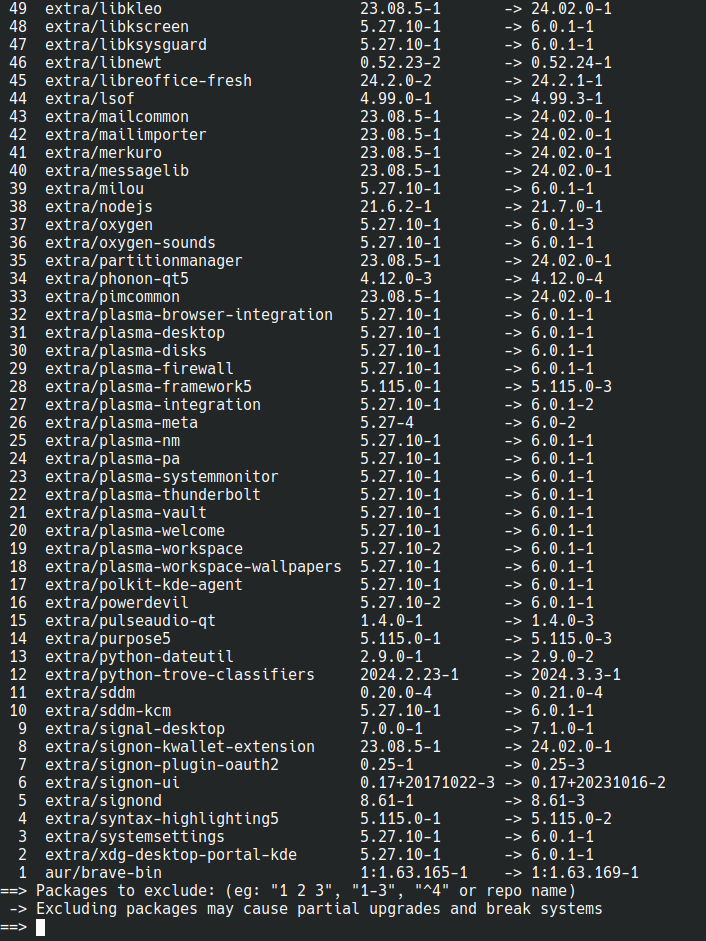
I installed it on my endeavour laptop last night and apart from reconfiguring my dock-like panel and weather widget, it’s all been plain sailing so far. Now I just need Tumbleweed to release it so I can update my main desktop!
My Endeavour laptop got it today. Couple of tweaks and it was running perfectly.
Funny you mention desktop: I’ve been waiting for Plasma 6 before rebuilding my Ubuntu desktop with Endeavour. Didn’t want to jump the gun, find out that it impacts gaming performance, and then have to rebuild back again. :) Guess I have a desktop to rebuild now…
I reinstalled EndeavourOS on my main desktop yesterday, fresh install, just for Plasma 6. So far, big worth it even though I have a lot to set up still.
One really annoying problem, in firefox the mouse cursor position is wrong. Clicking in firefox clicks on the thing 30-ish pixels above my mouse. I noticed that it only happens when firefox is snapped to the left or right half of the screen (of course that’s how I almost always use it). I can fix it if I maximize firefox then snap it left or right. 100% scaling on the monitor, nothing funky, reset theme/appearance, reset my firefox profile, etc…
Hopefully it gets sorted soon
I also had this bug for a moment.
Good to hear that. At least it’s not an “only me” problem so hopefully we see a fix soon.
that’s an odd one. make sure it’s reported on bugs.kde.org!
Looks like several reports / duplicates and like they’ve zeroed in on the problematic commit - https://bugs.kde.org/show_bug.cgi?id=482687.
Noice! Theyve been killing it with bughunting recently
install kde 6 :D grub shell prompt on reboot D:
Me and my Debian will have to wait for it…
A few more years tops.
I also switched to Wayland for a surprise challenge. And for the extra spice, I also have a Kwin script called Polonium, which supports Plasma 6 only in the current dev version directly from git. Some widgets do not work, but all in all, it’s relatively stable so far and I will get through it.
Good luck everybody.
THANKS OP, I WAS JUST WAITING FOR THAT MOMENT
WHY ARE WE SHOUTING!?!
Still waiting on tumbleweed :(
When should we expect this on Tumbleweed?
i upgraded last night! and when i booted up this morning, i was unable to log into any accounts in the login screen lol. if anyone else has a similar issue where the only option login screen gives you is wayland and that doesnt work for you or you want to use x11, what fixed it for me was installing
plasma-metaas for whatever reason that wasn’t on my system at the time. this allowed me to select x11 again from the login screen and my system is working as normal.i know we’re still in early days of plasma 6, but does anyone know any good calendar/weather/time widgets that i can replace this one with? https://store.kde.org/p/998901/ haven’t found another good calendar widget yet.
broke latte-dock
edit: and my window blurring/transparency no longer works
Is latte dock still maintained?
Hopefully it gets fixed since I know a lot of people like it, but it might be permabroke
It’s working fine for me. I like the improved icons and slightly adjusted layout, and the auto-hide panel feature is great.
Issues with my setup: window title applet isn’t yet updated to support KDE 6. I know there’s a version on the AUR that should work, but I’m waiting to see if it hits the Arch extras repo soon. My Papirus icons don’t seem to be applying, so all my folders are Green but Dolphin’s icon itself is blue. I also did get a weird temporary black box when moving a window out of the way from an auto hide panel, and the auto hide causes a stutter when it comes back into view.
1050 Ti laptop running X11 (optimus-manager) through HDMI with lid closed
Finally my qt6 apps have a consistent theme!
Mmm first releases! Working from home, its nearly close of play. I know … I’ll update my work laptop.
OK I now have LXDE for a fall back WM so I can read stuff rather more easily than using links in a TTY and switched out SDDM for LightDM - I needed sddm-git to get LXDE to start up. SDDM now simply crashes and dumps core - no idea why. Oh and I have switched to Wayland because X11 no longer works for me. I might put off updating the wife’s laptop for a while, at least until I’ve done my work desktop 8)
I must say its all rather pretty and smooth. Scrolling now has drag and acceleration, which is nice. I’m sure I’ll get KRDC to talk to the sodding wallet so my 100s of RDP connections will work again. For now I’ll call xfreerdp from the konsole. Perhaps I’ll get around to configuring KeePassXC and get around to using that instead. I share several rather large .kdbx with the rest of the firm.
Kvantum blur is broken :(
Didn’t realize this was happening and yay -Syu went brrr and it broke my shit. Probably doesn’t help that I’m running nvidia with linux (endeavouros). Wayland doesn’t work at all (black screen on login with only mouse ptr, wrong resolution), while Xorg is now much less smooth e.g. on the switching desktop animations. Moving windows around and in-window graphics are fine. Some graphical config stuff changed too; I’m still taking inventory.
I’m also currently playing with nvidia vs nvidia-dkms with different kernels to see if that solves anything.
EDIT: Looks like that my configuration was failing to set
nvidia_drm modeset=1correctly due to my unfamiliarity with dracut. Manually addingnvidia_drm.modeset=1to my kernel cmdline makes Wayland work (and quite well at that), though Xorg is still laggy.Sorry to hear that. Also on EOS and it is working great.
Same here on Lenovo Ideapad(I think) and EOS. No problems at all.