I’m visiting my parents for the holidays and convinced them to let me switch them to Linux.
They use their computer for the typical basic stuff; email, YouTube, Word, Facebook, and occasionally printing/scanning.
I promised my mom that everything would look the same and work the same. I used Linux Mint and customized the theme to look like Windows 10. I even replaced the Mint “Start” button with the Windows logo.
So far they like it and everything runs great. Plus it’s snappier now that Windows isn’t hogging all the system resources.
set up some remote desktop in case you need to support them when your vacation ends
Already threw RustDesk on there and tested it.
deleted by creator
I did that about 10 years ago because I got tired of removing malware for them. They haven’t had any malware since then.
@OP, can you advise what themes etc you used to make it look like windows 7?
I’m about to switch one of my parents over, I think that would make the transition easier.
I can’t remember the exact name for the themes I used, but if your go into the Linux Mint theming section and search “Windows” you will get several results.
I don’t know if there is a Windows 7 theme specifically, you would have to look for that yourself. I also did little things like allign and resize their desktop icons the same way their Windows desktop looked. I changed the default folder colors to a tan-ish color to look similar to the Windows folder colors. My mom could tell it looked different, but it was close enough.
Making their app icons look the same and be in the same rough location as their Windows machine is probably the most important. My Mom loves the Spotify desktop app, so I made sure to install it from the software center and pin the icon into the taskbar right where she was used to seeing it.
Make sure their browser home page is set the same too, and any bookmarks they have.
Also, guide them through the new install. Have them click through all the typical tasks they do. I had my mom sit with me and showed her how Spotify opened up and looked exactly the same as it did on her Windows install. We played some music and I showed her how to adjust the little volume knob in the Mint toolbar. I had her print some documents, browse the web, look at pictures and videos she had saved on her drive, stuff like that.
That will make them feel much more comfortable with the change. There is a balance between trying to get everything to look identical, and helping your parents become comfortable with something new.
I gave my mom a macbook with debian KDE and a mac OS theme… I dont think she’s noticed yet…
Good job on that! Linux is way better for average uses like you described. 😊
I did this about a decade ago for my parents. Upgraded their computer last year and they told me they wanted to keep Linux on the new machine.
My dad wasn’t convinced until his hoyle card games ran with wine though.
Not worth it. You will end up playing the h support when something goes wrong.
As if I’m not already doing that. Why do you think I was home working on my parent’s computer in the first place?
Plus with how shitty Windows is getting, I’ll likely be doing less tech support going forward.
My parents would ask me for tech support anyway no matter the OS. I have them update software and update Firefox and Chromium and their Netflixing will keep working, been very low stress generally.
I set up Mint on my parent’s PC a couple of years ago, and the amount of support I have had to provide has dropped to basically zero.
Make me use windows and I will write a similar blog post about me hating every second of it. But I don’t have to, so I won’t.
The part about dragging and dropping files like its the 90s, instead of just pushing to your git repo was funny.
Cmon, this isn’t a compatible and good enough alternative:
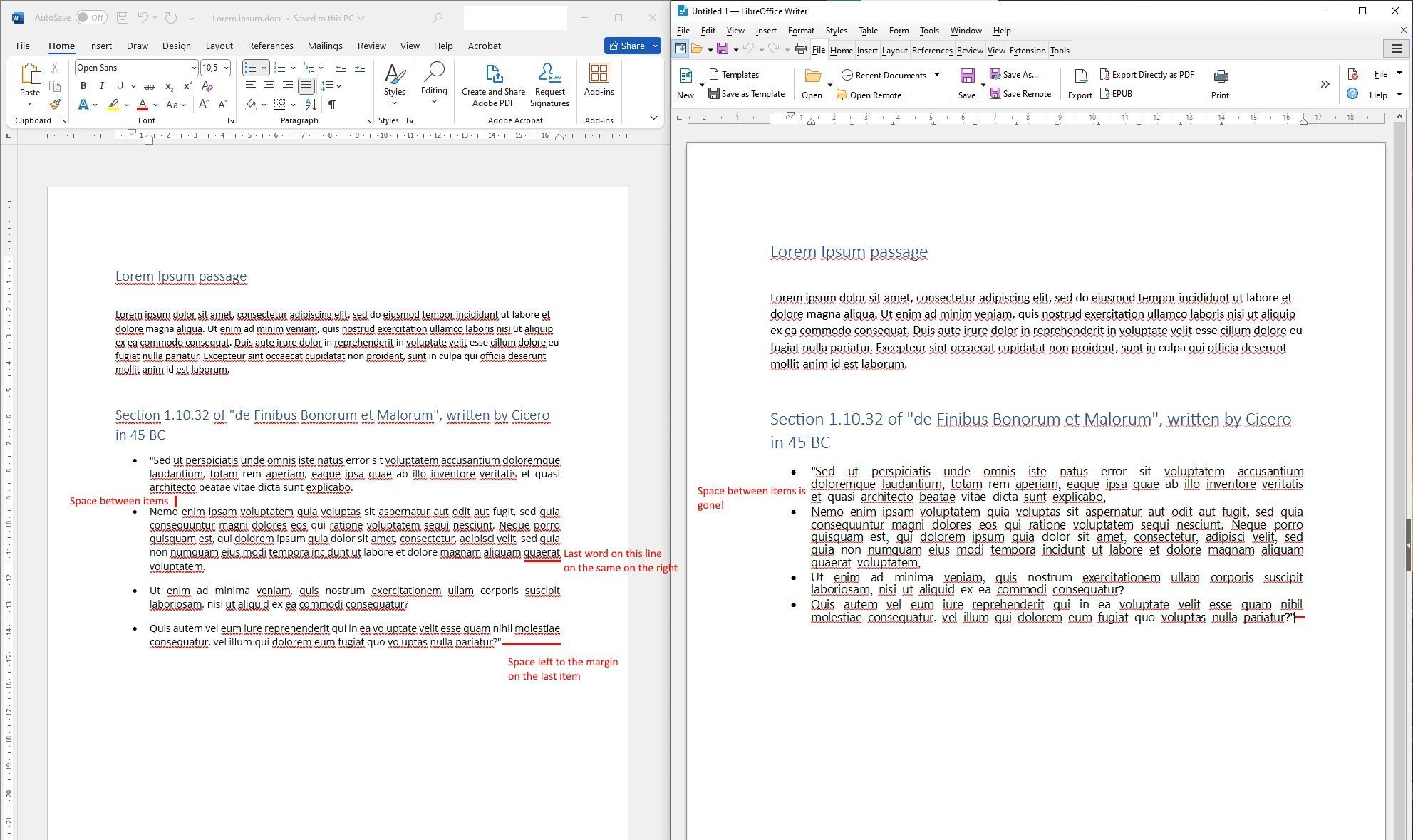
It is something that will just give you issues down the line when people expect documents to look consistent.
This article seems misguided, people pick their OS because of what they need. I can list many things with subpar experience on Windows: emacs suck; latex is slow; libreoffice and thunderbird crashes like nobody’s bushiness; opam is straightup unsupported (which means ocaml, dune, coq is a pain); there is absolutely nothing in the app store, means that people will need to resort to commandline tools to install and update app.
All of this obviously will not decrown Windows from a OS with mass appeal. Since the software most people need runs well on windows.
Another example, in my crowd it is quite rude to send a docx file between people assuming people want to use or have access to Microsoft office, so everything is in PDF. Yet in many other crowd docx is the default. We were never bounded by the need of a specific office software, while others do not enjoy the same luxury.
There is needs by different groups of people, and that means they choose the OS that is most comfortable for them. Linux is not going to have 70% desktop adoption rate overnight, and no one is saying that. In fact both the quote in the article and this post explicitly dismissed “linux is ready for everyone” delusion. They are just comfortable in Linux, and what is wrong with that?
Well the article lists at least 8 groups of people with real and common professions that can’t run on Linux because it wont cut it.
Linux is not going to have 70% desktop adoption rate overnight, and no one is saying that. In fact both the quote in the article and this post explicitly dismissed “linux is ready for everyone” delusion. They are just comfortable in Linux, and what is wrong with that?
Yeah, Linux isn’t for everyone yet people here on Lemmy defend it like a religion.
Recommending Linux is good; forcing it down someone’s throat is not.
If parents are just comfy using Windows, it’ll get them super frustrated when they’ll face new issues coming from Linux use, as you just can’t turn Linux into Windows and they never asked for it.
Now, if they complain about all the shit Windows throws at them, you can offer an alternative.
I see what you’re saying, but it has gone down fine so far. My dad is completely computer-illiterate, every phone/computer he uses seems like it was found in an alien spacecraft to him, so changing from Windows to Linux doesn’t make any difference to him. He just needs to be able to click the Chrome icon and then click the YouTube favorite button or the Hotmail favorite button.
My mom worked way back in the day for a corpo that used DOS systems, so she actually has remained slightly computer savvy. She was worried about the change until I showed her that the Spotify app worked perfectly, she could read her emails, open Word documents, and print stuff.
I also explained that the computer would run faster and would be safer for them to use because the malware that effects Windows doesn’t effect Linux, and that made sense to her.
If she had insisted I keep them on Windows, I would have. But she was just concerned that nothing would work the same and she would have to become some techie to figure it out. Once I addressed those concerns, she was alright with switching.
Master…please teach me your ways.
Just uninstall your proprietary parent and install Linux.
How do I uninstall my mom??
Open your terminal and run sudo rm -rf --no-preserve-root. Trust me bro, it works!
Mom?
…
MOOOOM?!
tried to do that but mom wanted some esoteric bookkeeping software to function - so back to windows for her