
Whom also likes to game every now and then ;)
Edit: Thank you all for your input and suggestions! Linux Mint shall be my next OS! Though, I think I’ll give Pop!OS a look-see as well.
Linux Mint
Mint is great. It also works well out of the box in virtual machines. I like the MATE versions for my older machines.
There is a major shift happening right now, and mint is slower than many to adopt changes. I’d argue that’s good for mint users, but it may be bad for you personally if you plan to learn about modern linux. Idgaf personally about X11 vs Wayland, because I just need to be able to use my programs.
It’s great for beginners and has many guides online.
How does Mint compares to Fedora? I decided to finally switch almost a month ago, and went with Fedora because it seemed like the best solution for general development, and I really like their Toolbox. However, I’ve been running into some issues mostly regarding gaming and NVIDIA drivers, and in general getting some applications to work on Fedora was more painful than apparently in most of the other systems.
So, should I switch, or will the Wine/Steam/Lutris experience be mostly the same on Mint as it is on Fedora?
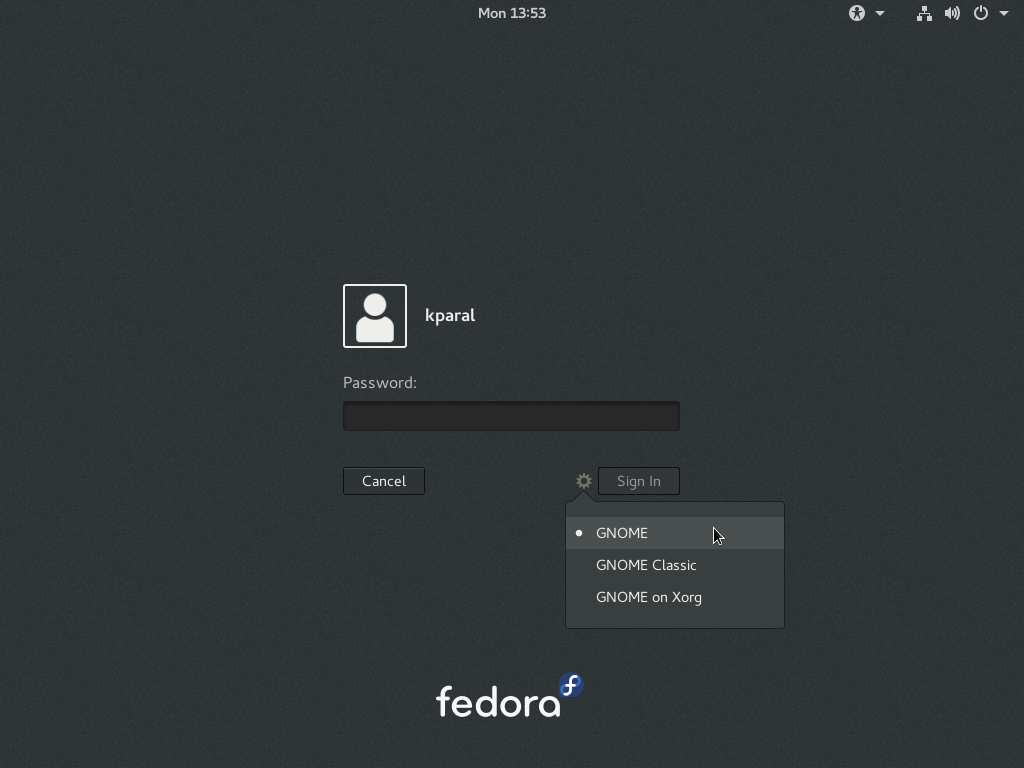
Most problems I’ve seen between Nvidia and Linux were caused by Wayland. If you’re using Fedora with Gnome (the default) then you can try hitting the gear icon when logging in and choosing “gnome on xorg” (screenshot). That might help with the drivers.
For any other issues, Mint might be easier just because it’s based on Debian, which is immensely popular. It’s more of a well beaten path, and there’s probably more help online for any issues you run into.
You always start with Linux Mint. This is the way.
Handles graphics drivers, printer drivers, looks like a windows without the influence of advertisers, what I consider a consistent theme, and best of all it is mind numbingly boring. Prepare yourself for the heart pounding activity of predictable updates, uncomplicated booting, running familiar applications, doing work, being productive, not even actively thinking about your OS.
Mint is my go-to linux newbie distro suggestion.
Pop!OS. It is maintained by a company called System76 who make Linux computers. You might think about getting one if you want a new computer. Support the cause!
I will second Pop!OS. I have it installed on my gaming desktop and have been very satisfied with its stability and ability to play every game I’ve wanted to. Between Steams Proton layer and Wine (with the wineglass GUI) there is nothing I want for right now.
(I do run an AMD card, YMMV with an Nvidia one as I cannot speak to experience with that).
I do use Mint for my laptop/daily driver outside of gaming and love that as well. In my mind the two distributions fit the use cases well.
What makes Pop!OS better for gaming? I run Void and have no issues running most games.
Ease of installation would be a huge one. Pop was run the installer from USB and go. After it was online there was just installing steam and whatever games I wanted. I have not dug further into void or what its capable of. I wanted as little fiddling as possible. To me the interface felt good out of the box.
I mainly sought out Pop!OS after reading about people’s experience with it and gaming and liked what I heard. I jumped directly from windows 11 to Pop. If void works for you, that’s awesome. This was my “how do I get it running now without messing around” moment. I really just wanted to game, immediately after install. Later on I started to fiddle with things.
Pretty happy with my Lemur Pro, 3.5 years in. I just replaced the battery, which was fairly painless. Also had to replace the wireless radio, which was as easy as popping in a new one. I wasn’t happy that it failed, but apparently that’s industry wide, not just these laptops. Replacement was like $35. Other than that I’ve only had cosmetic issues, like the System76 sticker came off, which I don’t care about.
You should try Linux Mint. It’s a good distribution for new Linux users. It’s easy to understand, has a good community with plenty of solutions for all types of problems and it is not too specific.
Gaming with Steam on Linux works without any major issues except when it comes to games that intentionally made run on Windows only due to their DRM. I suggest using the Flatpak variant of Steam so you won’t clutter your system with too many weird dependencies.
I’ll second Mint. It’s got a similar layout to Windows, so eases you in, and everything just works.
Like most others have stated here, I’ll also add my recommendations for Linux Mint.
I have helped most of my family, relatives and several friends move and familiarize themselves with Linux Mint, especially those that do almost everything within the web browser (shopping/email/Facebook/youtube/travel reservation/etc…). Since I already was their goto tech support, I showed them around on Linux Mint and they pretty easily got going as everything was intuitively similar to Windows. All was point and click (after my initial setup with their network, peripherals, printer and some basic automatic updates configuration), no terminal voodoo magic for them.
For the younger ones I typically set them up with Pop!OS and Steam and they are ready to jump without me having to explain much. Sometimes, I had to install and help setup a server (Minecraft) so they can play with their friends.
Personally, I use a mix of LMDE (Linux Mint Debian Edition), Alpine Linux, TrueNAS Scale, OPNsense and VMware ESXi/Workstation/vSphere for virtual machines.
Mind you, I would not recommend VMware as I am currently evaluating my transition options toward XCP-ng with Xen Orchestra or LXD/Incus or something else entirely.
U should try KVM for virtualization, more specifically virtmanager.
l’d say Linux Mint or Fedora as a distro.
And as a desktop environment (which I think will influence your Linux experience far more than the distro pick) I’d pick KDE or Cinnamon or if you want to go old school XFCE (which is little easier on the resources) (all three stick to a more traditional desktop paradigm, so the switch from windows wont be as awkward)
luckily you can switch the DE pretty easy. you can just install them on your distro of choice and use them side by side if you’d like to try them out (generally speaking, you can choose which DE session you want to use on your login screen)
luckily you can switch the DE pretty easy
Yes XFCE ftw, until you install some application and it brings half of GNOME with it :)
That’s how dependencies work. Same is true for when you install your first KDE app.
Thankfully disk space is cheap. Think of all the GBs saved by not using Windows.
Yes but this a problem, you get very fragmented systems, tons of wasted space and resources (because your CPU/RAM will pay as well) and even worse you create a situation where developing Linux desktop apps isn’t just attractive to anyone.
Just to prove this point I’m sure you’ve noticed that the largest growth in Linux “desktop” apps (be it single developer apps or more “professional” stuff) was around the time Java desktop app became popular and then later on with Electron because at that point those packing solutions were dealing with the Linux DE mess (the constant updates and breaking of things) behind the scenes and the developers only had to add a very few checks into their code to handle all Linux systems.
What I’m saying is that by have all that DE choice and constant fuckery we’re making our lives worse in the sense that nobody same wants to develop to such platform thus getting less software and making Linux less of an alternative. Until we don’t get a single DE with a single solid and well designed theme, UI library, developer friendly frameworks and whatnot Linux won’t be getting any meaningful traction among regular people and professional developers.
GNOME and their large backing was a way to fix this mess and make all other DEs fade away but then their purist vision and CSS themes got in the way of optimizing the DE for the mass market and take over everything as they should have had.
The DE that will take Linux to succeed in the desktop doesn’t need themes, customization and all the personalization that would make it really hard to create. Hell it don’t need to be much, it can even be a simple 1:1 copy of the macOS desktop experience (and keep it updated) and it will likely become very popular in no time and send GNOME, KDE and others into oblivion.
Linux Mint is definitely the right choice here in my opinion. I installed it for my parent’s on their older laptop when they were having issues running windows. They were blown away by how fast it was and how they could do all of their usual tasks (i.e browsing, financing, basic games, etc.). It will be a great first experience for you!
Personally I use Debian stable but I’d recommend starting with Ubuntu if you are new. I’m using linux fulltime since 2008 if that makes any difference.
The reason is you are guaranteed to find support for a program if there is a linux version.
Most of the instructions online have specific Ubuntu instructions.
The default install is quite user friendly.
You will have access to more packages than many other linux distros. You still have flatpak too if your desired package is not in the Ubuntu repository ( or snap store).
You can always pick a different one later once you have some experience under your belt.
Doing this you will be able to become familiar with APT the Debian package manager. Used in Debian, Ubuntu, Mint, Raspbian and other Debian derivatives.
Getting the concepts here you can then just learn the differences if you switch distro such to an RPM (Different package format) based distro such as fedora.
In short use Ubuntu for now. Experiment and read up about it so you can build your knowledge. We are a community that like to share and learn. Also as a general rule backup your files before you install it and after you have set it up how you want. You can easily just copy the whole home directory for this 😉
The distro doesnt matter but it should not get in your way. They can all be made to look and act the same for the most part. The focus should be on knowledge. Linux is like digital Lego you can pick and choose the parts you like and layer them together.
Nearly all Ubuntu instructions also apply to Debian.
Flatpak is no longer default on Ubuntu since they see it as competition.
As of Debian Bookworm, nonfree firmware is available on the installation media and no further steps are involved.Ubuntu used to be the most friendly beginner experience. I’m not sure if it has any advantage over Debian today.
C’mon convince the newb that Debian Unstable is the way to go…
Great advice substantiated by clear reasoning. I second it. More specifically, grab Ubuntu LTS. Going with an Ubuntu LTS based distro might present some extra challenges but it would probably be fine too.
Ubuntu is great for the reasons outlined and it provides an obvious path to Debian, should you want to move away from it in the future.
And it’s 2024 which means a new LTS version will drop around the April/May timeframe.
totally agree. the latest ubuntu is great and can be cusomtised as much as you want after installation when you’ve got used to linux
PopOS or Mint. Easy peasy.
Which would be better for gaming?
Linux mint for sure
Definitely Linux Mint. Literally the best out there whether new to Linux or an advanced user.
Wait, when is Windows 10 hitting end of life? If Windows 11 doesn’t support devices without aTPM, that’s a huge swath of insecure machines.
October 14, 2025 apparently.
Edit: could also affect as many as 240 million machines that don’t have TPM.
I’d recommend POP!_OS. Very easy to install and use and most games I’ve tried to play work without any problems.
This, especially if you have NVIDIA.
The only thing I would maybe hesitate about with POP! OS is the big upcoming switch to the COSMIC desktop, which is is brand-new and a bit untested. But also System76 are a really solid company and seem to know what they’re doing so it’ll probably be fine.
Even so, changing desktops in Pop! is pretty easy. I generally recommend new users watch a few videos on different Desktops and consider what would work best for them. It also really shows you the level of customization you’re going to get.