

I have used Linux on and off for 15 years. I consider myself a casual user and stuck to the mainstream DEs (mostly KDE, XFCE and some Cinnamon). Gnome has been a hurdle for me before and after the big version 40 changes, I couldn’t get my head around how they handled the workspaces and workflow. At some point I I tried out an extension hat changed all of it.
It moves the workspaces to a vertical panel and the programs onto a horizontal panel. In a workspace you can view the programs full screen or tile them.
Several Programs inside a Workspace. It’s basically they same way Gnome works. However for some reason it just makes sense in my brain. No idea why. (I’m looking at WMs that work in a similar way atm. Maybe I’ll take the plunge away from DEs at some point)
Has such a small change ever saved a Desktop Environment for you and is essential if you ever install it?
I really like compositor/wm/DE which allow for keyboard driven movement of windows between workspaces and workspaces between monitors. Especially the latter requirement is only met by a few wms, e.g. sway/i3, hyprland.
I can’t stand it if switching to the next workspace all workspaces on all monitors change. This makes it annoying to use with a second monitor that mostly display the same windows (e.g. messaging, video, docs).
I don’t like Gnome but Dash to Panel at least makes it usable for me. As for tweaks, I always move KDE’s taskbar to the top of the screen rather than bottom.
I’m not sure that I’d call vanilla GNOME (or any modern DE) unusable for me, but Tiling Assistant is really great. I’m looking forward to GNOME’s upcoming tiling changes so I no longer have to rely on an extension to give me quarter tiling.
Dash to Dock is also nice, though I don’t necessarily mind having to hit Super to see my dock.
deleted by creator
deleted by creator
I frequently switch between audio outputs (headset for calls and focused gaming, speakers for other use). I installed an audio switcher applet to make changing that easier and faster. But cosmic is perfect for me other than that.
Tiling addons. I like having a full DE, but I also want tiling, so Pop!_Shell on GNOME and Polonium on KDE are invaluable (and yes, COSMIC looks really promising).
GNOME on Fedora 39 with the Pop Shell extension installed. For me, perfection :)
On Gnome,
- Workspace Matrix: provides a customizable n x m workspace grid, and a customizable pop-up that shows live preview of all workspaces and their windows (incl. e.g. video playing).
- Forge: windows tiling
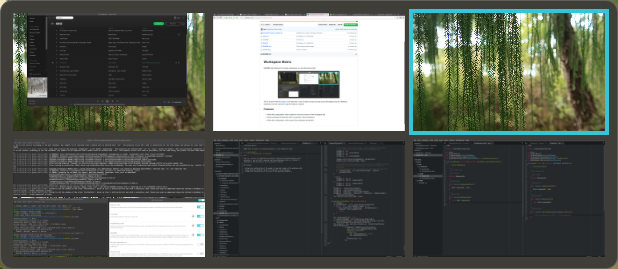 (screenshot from Workspace Matrix extension site, not mine)
In combination, these two features allow me very quick overview of everything I have open, presented in an ordered fashion, allowing quick, keyboard-driven application change.
I’m not aware that the exact features of Workspace Matrix are reproduced by anything in any other DE.
KDE plasma has it natively.
I don’t think it does. It didn’t when I checked a year ago, at least. You couldn’t get live previews on the workspace pop-up.
Can you point me to the feature you refer to? If it really does this, it would be a major game changer for me.
Oh, true, you don’t get previews of the windows inside. However, that shouldn’t be very hard to implement, so you might have luck if you ask for it to be in Plasma 6.