

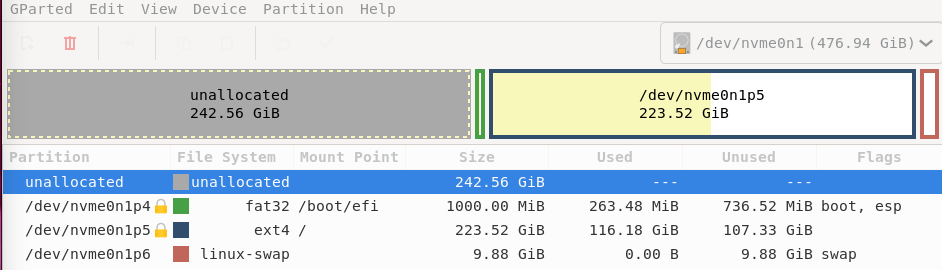
I recently removed windows 10 from my pc, how can i merge the unallocated space with /dev/nvme0n1p5? There’s the boot partition between so i can’t just adjust one of them and merge with the other using the resize/move button. How can i do it?
I recently removed windows 10 from my pc, how can i merge the unallocated space with /dev/nvme0n1p5? There’s the boot partition between so i can’t just adjust one of them and merge with the other using the resize/move button. How can i do it?
how can i do that?
Right click, resize/move.
To add on to this, don’t click the handles on the boot block, click and drag the entire boot block itself. You’ll be able to move the boot partition to the left, then you can extend your main partition.
i’ll try this as soon as i have the time to flash the live iso. Btw i think i already tried it many times but it didn’t work. I’ve even watched tutorials. It just does nothing
So, I’ve had it not work before, usually for odd reasons. One thing to try is to delete the other partition, then apply, then try to move it.
Resize/move is finicky though.
It shouldn’t do “nothing”. Once you press apply, it’s possible you get error messages, but it shouldn’t say it’s complete and do nothing. That would be a big bug!
Boot on GParted ISO. Moving your boot may bork grub, so you would need to chroot and update it