For me, it’s hands down Flameshot. The best screenshot tool in the world - I’ve got it hooked up to my PrtScrn key for super easy screenshots.
I also love Kwrite as a Notepad++ alternative, and KolourPaint as a MSPaint alternative
Firefox with tree style tabs, with the user CSS that removes tabs and combines bookmarks bar into the title bar.
Away from computer right now but I’ll take a screenshot in an hour or so.
And Emacs. :)
Back at my computer now!
OK, here’s my screenshot:
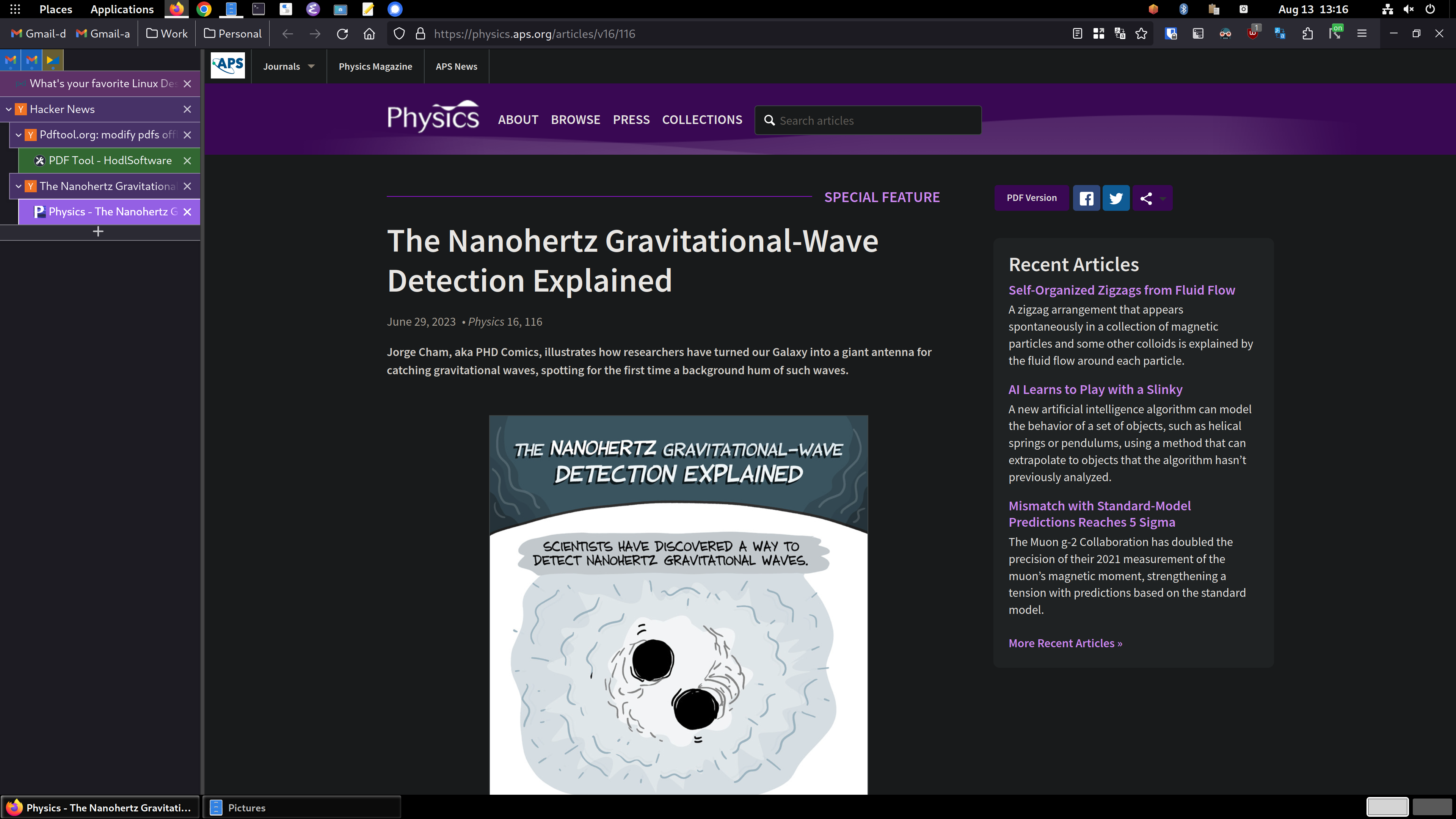
So, you can see the tree style tabs (TST) in the sidebar area on the left. I’m using the “photon” theme for TST. with another extension for TST called TST Colored Tabs. If you middle-button-click a link, it’s opened in a new tab like usual, but TST also assigns it as a child tab of the page you were viewing. It’s incredibly useful for keeping track of where you are and what you’re doing. Especially in my DevOps job, I have dozens of tabs open and chaos would reign supreme if I used top-of-window tabs like standard. You can see the bookmarks toolbar has been dragged up into the title bar using the customize toolbar window accessed by right clicking on the title bar.
To accomplish this you need to enable a setting in about:config called
toolkit.legacyUserProfileCustomizations.stylesheets, set that to true. Then exit Firefox.Then create a directory called
chromein your profile directory, which on Linux is in~/.mozilla/firefox/PROFILENAME/, which you can get from theabout:profilespage. Inside thechromedirectory, you create a file calleduserChrome.cssand add this stuff to it:#main-window[tabsintitlebar="true"]:not([extradragspace="true"]) #TabsToolbar > .toolbar-items { opacity: 0; pointer-events: none; } #main-window:not([tabsintitlebar="true"]) #TabsToolbar { visibility: collapse !important; } #sidebar-box[sidebarcommand="treestyletab_piro_sakura_ne_jp-sidebar-action"] #sidebar-header { display: none; } /* Display the status bar in Firefox Quantum (version 61+) permanently at the bottom of the browser window. Code below works best for the Dark Firefox theme and is based on: https://github.com/MatMoul/firefox-gui-chrome-css/blob/master/chrome/userChrome.css This userChrome.css file was last modified on: 28-Jun-2018. Tested to work with Firefox 61 on Windows. Related blog post: http://www.optimiced.com/en/?p=1727 */ #browser-bottombox { height: 20px; border-top: solid 1px #505050; } .browserContainer>#statuspanel { left: 4px !important; bottom: 0px; transition-duration: 0s !important; transition-delay: 0s !important; } .browserContainer>#statuspanel>#statuspanel-inner>#statuspanel-label { margin-left: 0px !important; border: none !important; padding: 0px !important; color: #EEE !important; background: #333 !important; } window[inFullscreen="true"] #browser-bottombox { display: none !important; } window[inFullscreen="true"] .browserContainer>#statuspanel[type="overLink"] #statuspanel-label { display: none !important; } /* Begin section to move system UI buttons to the same UI bar/box as the addressbar */ /* Adding empty space for buttons */ #nav-bar { margin-right:100px; } /* For dragging whole window by mouse*/ #titlebar { appearance: none !important; height: 0px; } /* Fix for main menu calling by Alt button THIS BREAKS THE UI!! */ /* #titlebar > #toolbar-menubar { margin-top: 10px; } */ /* Move minimize/restore/close buttons to empty space */ #TabsToolbar > .titlebar-buttonbox-container { display: block; position: absolute; top: 5px; right: 1px; }And there you go! TST has more tips and configuration details in its Github project: https://github.com/piroor/treestyletab and https://github.com/piroor/treestyletab/wiki/Code-snippets-for-custom-style-rules#for-userchromecss
emacswithdoomFTW.Looking forward to learning how to get tree tabs in FF.
I updated my original comment above yours. I hope my comments/instructions are understandable, please let me know if I wasn’t clear on anything!
-
Amberol is probably one of the biggest hidden gems in GNOME apps. It’s a simple easy music player whose background color changes based on the song’s artwork.
-
Parabolic is another GNOME app for downloading videos from youtube using yt-dlp. It’s super easy to use and even allows for multiple concurrent downloads.
-
mpv is one of those rare moments where using a proprietary implementation is objectively worse. Must install on any personal computer/mobile device.
Excuse my silly question, but what does mpv do that vlc doesn’t?
MPV has automatic native wayland support, VLC doesn’t (yet, see https://wiki.archlinux.org/title/VLC_media_player#Wayland_support)
I haven’t found any other large differences in functionality when it comes to simply playing video (only thing I use either one for).
MPV handles decoding much better than VLC, in my experience trying to watch fansubs
Both are comparable in terms of video playback (both use hardware acceleration and ffmpeg) but mpv’s appeal is that it’s ultimately a minimal (as in lack of apparent GUI) command line tool rather than a fully featured application like VLC. I like mpv because of it’s non-features which is why it’s the backend for a lot of Desktop environment video players.
If you want minimalism I advise you to use a tiling window manager instead of Gnome. If you want Wayland absolutely, use Hyprland.
I use POP!_OS right now so I’m waiting for System76 to release their
cosmic-epochto have the definitive non-GNOME/KDE wayland desktop environment.
I have MPV setup to play any YouTube link when I press ctrl cmd m with a YouTube video url in my clipboard.
I use Lollypop for music, well in reality i just use MPV for that too lol but i downloaded that “just in case”
Mpv is a good engine, but I prefer something like smplayer+mpv for all the extra functionality. I also like that VLC has tons of features, like full file/codec info and stats. I know there are other ways to get that info, but it’s very easy in vlc.
-
Wine/Proton. It’s a one-stop solution for gaming on Linux (for current games). Lutris is also worth mentioning as a frontend/launcher.
Although, I find it a sad commentary that the most upvoted (even by me) in this thread is something to made to run non-linux software. :(
that’s one way to look at it, but if not for WINE and proton we’d not have had the renaissance of desktop Linux that’s well under way :)
And I totally agree with you. I just lament that games and other made for Windows software is what’s enabling that. People should just want a free and opensource operating system as a matter of self interest… but no. It’s games and Windows apps. Yet another sign that our species is just sick in the head. :)
I’m with you that we need some deprogramming when it comes to how we’re far too complacent with the privacy-ignoring and humanity-disrespecting behaviour of Microsoft. But at least personally I was always someone who accepted it with gritted teeth because the alternatives sounded like a downgrade in other ways.
Now that Linux is faster, smoother, more user friendly and compatible than ever, it made the decision to delete my Windows partition much less daunting.
And now if Linux does give me headaches (it’s not a perfect experience!) I’m much less likely to immediately give in and reinstall Windows because I’m now accustomed to the aspects that I didn’t realise were so important to me before.
I clink my beverage with yours, dear person!
Only reason I’m holding on to my Windows partition at this point is for rare scenarios like needing to reprogram my VKB stick, which only has a Windows executable. Other than that, I’ve not fired it up in months. And I’m a pretty rabid gamer.
It’s taken a long damn time to get here.
Check out Bottles for running Wine and derivatives from a GUI :)!
gparted because it’s the best partitioning manager with a gui that I’ve used
The kernel. I literally can’t use my computer without it!
Jokes aside, I’m a big fan of Kolourpaint too.
tbf the zen-kernel is a really cool thing to have if you get it package correctly into your system.
It is, and I’ve used it for a while. I don’t recall why I stopped it, it was a long time ago; perhaps I didn’t notice any meaningful difference in performance? Stock kernels are good enough for most purposes.
It’s probably Neovim. I spend most of time in a day while working on it. Its suitable for almost all code and text editing jobs.
Also I should have to add okular which is really nice for reading pdf’s and mangas.
xmonad- tiling wm because I’m too lazy to place windows by handsfirefox- since a lot of things I’m working with is web based and I like my adblock and don’t want google spying on meurxvt- a terminal that is fast enough for most applications yet doesn’t use as much memory as fancier onestmux- a terminal multiplexer - terminal tabs are not as nice plus lets you leave stuff running remotelyneovim- I need a text editor and it works great for that purposes covering all my needs
Being a flutter dev (and shameless fanboy) I will suggest people try:
appflowy - a FOSS near-clone to Notion.
spotube - FOSS music streaming using the spotify API for metadata and youtube for music playing/downloading. Completely free of ads and works surprisingly well as long as the music you like is mirrored to YouTube.
honourable mentions:
Plex, Nextcloud, Radarr, Sonarr, qbittorrent. Not your usual apps for these kinds of threads but they’re absolutely top-tier for linux home servers.
I like KDE Connect quite a bit. Its a great tool to show of in front of my Windows friends and super usefull for media control.
Konsole
KDE Connect, Spectacle
xorg. I used its predecessor a lot in the past, and I still get PTSD when I see an XFree86 config file.
By far it’s Kate, even though I’m now a neovim user. It’s just a great IDE.
I dunno if it counts, but I use libreoffice more than anything else. It’s a very well made piece of gear.
I’ve written multiple novels with it, short stories, essays, a home brew ttrpg system, etc. It doesn’t just do “good enough”, it is on par with anything else I’ve ever used.
Honestly, I installed it on my windows PC recently, and I found it really clunky. And it sounds like there’s no dark mode?
I do IT for a living, and for as big of a bitch Office is, it does work pretty damn good… When it’s working. I felt like I went back in time a decade when I was working with Calc.
I’m not trying to fight, but I’m genuinely curious, do you only use Writer? Have you worked with Word lately to compare how they’ve changed? Thanks
Not OP, but I like that libreoffice:
-
Works on Linux without wine/bottles
-
Isn’t 9GB
-
Has no hooks into 0365 or Office.com or any other web junk I don’t need
-
Can be updated in less time than reimaging a workstation
-
Doesn’t change major elements of the GUI including available options and default styles each major update
I also trust the document recovery options more, and enjoy using ‘free’ software when possible
-
Oh, I’ve used it, and it isn’t worth the price. They could offer it for free and I still can’t say I’d switch. It isn’t that there aren’t differences, there are. They just aren’t enough to matter.
Writer, that’s the bread and butter. Calc is mainly for tracking timelines, “lore”, etc. Draw isn’t a common use.
Dark mode isn’t as superior when writing long form though. It’s nice, but it’s easier to catch weird patterns for me (dyslexia). Calc vs excel, well that’s not really a competition for professional use, though calc functions well enough for the kind of use I put it to.
deleted by creator